
86. Watchdog Fundamentals
Question.4
Consider the following Arduino UNO code and circuit diagram. What will be the behavior of the LED connected to Pin 12?
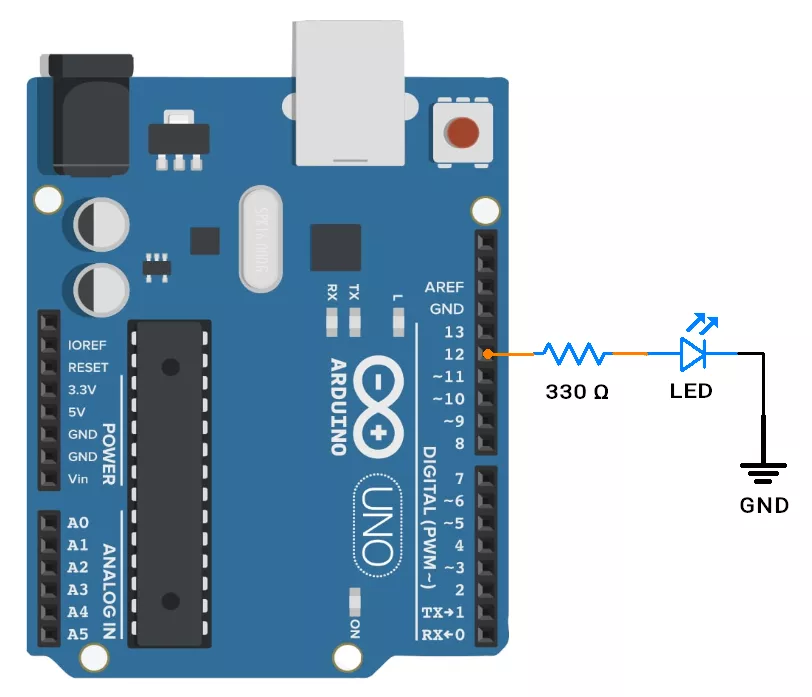
Code:
#include <avr/wdt.h>
#define LED_PIN 12

void setup() {
 pinMode(LED_PIN, OUTPUT);
 digitalWrite(LED_PIN, LOW);
 delay(3000);
 wdt_enable(WDTO_2S);
}

void loop() {
 digitalWrite(LED_PIN, HIGH);
 delay(2000);
 wdt_reset();
}Watchdog Timer
Watchdog Timer (WDT) is a countdown timer that resets the microcontrollers if not cleared (or "kicked") within a preset time.
The software must regularly reset the WDT to show it's working correctly.
If a fault causes the code to hang or misbehave, and the WDT isn't cleared in time, it triggers a system reset, helping recover from software crashes or infinite loops.
Why its used?
Watchdog is a safety mechanism—if your code hangs or crashes, the watchdog can auto-reset the microcontroller to recover.
Watchdog Timer Types
- Internal WDT: Embedded into the MCU.
Most internal Watchdog Timers use a separate clock, so they keep running even if the main system clock fails. - External WDT: A separate chip that offers higher reliability and works independently of the MCU’s clock or power. (e.g. MAX6814 or TPS3823)
An external watchdog is used in critical applications where system failures can lead to costly or hazardous outcomes (e.g., medical devices, automotive, industrial control).
Critical Systems: If the WDT is used in safety-critical applications (e.g., medical, automotive), multiple external WDTs are also used.
Enabling the WDT
In most microcontrollers, WDT is disabled by default; we can enable it :
- Temporarily: We can enable it in the code. It is again disabled after RESET.
- Permanently: Set fuse bits (like WDTON) so it always runs, even after RESET.
Watchdog Operating Modes
The watchdog timer can be configured in one of the following modes (in most microcontrollers).
- Reset Mode: If not cleared in time, the watchdog resets the microcontroller. Commonly used to recover from code hangs or faults.
- Interrupt Mode: On timeout, the watchdog triggers an interrupt instead of a reset. Useful for handling faults without restarting the system. It can also be used to wake up the microcontroller from sleep modes.
- Interrupt + Reset Mode: The watchdog first issues an interrupt on timeout. If the fault isn’t fixed, it then resets the microcontroller.
- Window Mode: The watchdog must be cleared within a defined time window. Clearing it too early or too late is treated as a fault. This helps detect issues like unexpected execution timing or stuck code, improving system reliability.
NOTE: Atmega328p doesn't support Windowed Watchdog Mode.
Important Considerations When Using Watchdog Timer
- Choosing the Appropriate Timeout Period
- If it’s too short, we might get resets even when the code is working fine.
- If it’s too long, it might take too long to catch a problem.
- Code May Reset WDT Even When Stuck
- A stuck program can still periodically reset the watchdog if it’s stuck in a loop that includes a WDT reset.
- In such cases, the watchdog won’t detect the fault, defeating its purpose.
- Watchdog Timer Runs in Sleep Modes
- The WDT can remain active during low-power sleep modes.
- This can cause unexpected resets or increased power consumption, especially in deep sleep scenarios.
- WDT Not Reset in All Code Paths
If some code paths don’t include a watchdog reset (like in rare errors or long loops), the WDT may timeout. This leads to unexpected resets that are difficult to debug. - WDT Misuse for Timing
Using the watchdog as a regular timer instead of a safety tool is poor practice. It has a less accurate clock, leading to unreliable timing and potential conflicts with its reset functionality.
WDT Registers
In AVR microcontrollers, the Watchdog Timer (WDT) is controlled using the following key register:
| Register | Description |
|---|---|
| WDTCSR |
|
| MCUSR → WDRF bit | WDRF bit shows if the last reset was due to the watchdog. |
NOTE : Similar Registers are present in other microcontrollers for controlling WDT. Few microcontrollers, like ARM, have more registers for advanced control and modes (Windowed mode).
Some MCUs require BOD to be enabled for WDT to work reliably during power dips.
Driver setup
- Set Timeout: Configure the watchdog timeout using prescaler or WDT bits (milliseconds to seconds) based on your application needs.
- Start WDT: After setup, the watchdog starts automatically or via a control bit. It must be reset periodically in code to prevent an automatic system reset.
- Reset WDT: Use instructions like wdr(), CLRWDT(), or watchdog_reset() (depending on the MCU) to "kick" the watchdog and keep the system running.
- Use Interrupt Mode (Optional): If enabled, the watchdog can trigger an interrupt instead of a reset. Write an ISR to handle it, and enable global interrupts.
- Disable WDT (if allowed): Some MCUs require a timed unlock sequence to disable the WDT, while others restrict it to startup or fuse settings for safety.
NOTE: Some microcontrollers allow enabling or disabling the WDT via fuses or a bootloader. Others keep it always enabled for safety.
Also Some MCUs require BOD to be enabled for WDT to work reliably during power dips.
Watchdog Timer Functions in Arduino UNO
| Category | Name | Description |
|---|---|---|
| Include Header | <avr/wdt.h> | Required to access all WDT functions/constants |
Functions | wdt_enable(x) | Enables WDT with a specified timeout. e.g.WDTO_15MS, WDTO_500MS, WDTO_8S, etc |
wdt_disable() | Disables the Watchdog Timer | |
wdt_reset() | Resets (or "kicks") the WDT |
Examples
1. Basic WDT Reset Example
This example shows how to use the WDT to automatically reset the Arduino if it gets stuck and fails to reset the watchdog in time.
Code
#include <avr/wdt.h>

void setup() {
  Serial.begin(115200);
  Serial.println("Starting...");

  // Enable WDT with 2-second timeout
  wdt_enable(WDTO_2S);
}

void loop() {
  Serial.println("Running normally...");
  delay(1000);

  // Reset the WDT timer to prevent reset
  wdt_reset();

  // Uncomment the next line to simulate a crash (WDT reset)
  // while(1);  // Infinite loop, no wdt_reset(), causes reset
}
2. WDT Interrupt Mode (Wake from Sleep)
This example puts Arduino to sleep and wakes it up periodically using the WDT interrupt.
Code
#include <avr/sleep.h>
#include <avr/wdt.h>

volatile bool wdtWakeup = false;

ISR(WDT_vect) {
  // WDT interrupt triggered, wake up MCU
  wdtWakeup = true;
}

void setup() {
  Serial.begin(115200);
  Serial.println("WDT Interrupt Wakeup Example");

  // Setup WDT interrupt mode with ~1 second timeout
  cli(); // Disable interrupts
  wdt_reset();
  // Enable change of WDT settings
  WDTCSR |= (1 << WDCE) | (1 << WDE);
  // Set WDT interrupt mode, timeout ~1s
  WDTCSR = (1 << WDIE) | (1 << WDP2) | (1 << WDP1);
  sei(); // Enable interrupts
}

void loop() {
  Serial.println("Going to sleep...");
  delay(100);  // Give time to print before sleep

  wdtWakeup = false;

  set_sleep_mode(SLEEP_MODE_PWR_DOWN);
  sleep_enable();
  sleep_cpu();  // Go to sleep here

  sleep_disable();

  if (wdtWakeup) {
    Serial.println("Woke up by WDT!");
  }
}