
29. ADC Serial plotter
Back To All Submissions
Previous Submission
Next Submission

Solving Approach:
How do you plan to solve it?
Set the AnalogPin to A0
Read Value form the analog pin
Print on the serial plotter
Sampling Delay
How to Use the Serial Plotter
- Upload the code to your Arduino.
- Open Tools → Serial Plotter in the Arduino IDE.
- Make sure the baud rate at the bottom of the Serial Plotter is 9600.
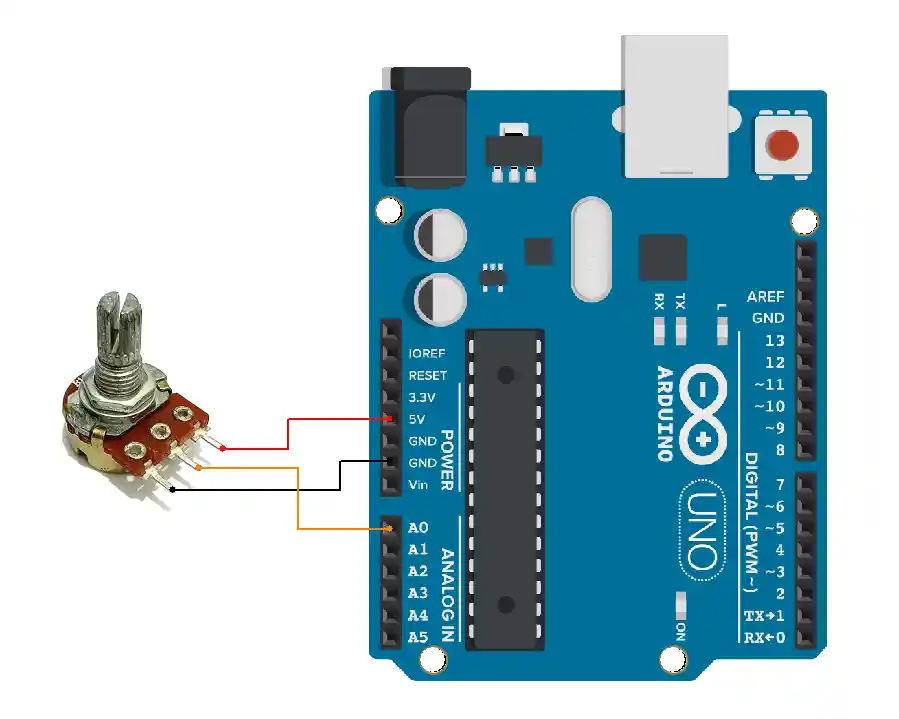
- Apply an analog signal (e.g., from a potentiometer or sensor) to A0.
- The waveform or value changes will appear in real‑time.
Code
/*Paste your code here*/


/*
  Read ADC value from analog pin and plot on Serial Plotter
*/

const int analogPin = A0;   // Analog input pin

void setup() {
  Serial.begin(9600);       // Start serial communication
}

void loop() {
  int adcValue = analogRead(analogPin);  // Read ADC (0–1023 for 10‑bit ADC)

  Serial.println(adcValue);              // Send value to Serial Plotter

  delay(10);  // Sampling delay (~100 samples per second)
}
Output
Video
Photo of Output
Add a photo of your hardware showing the output.
Was this helpful?
Upvote
Downvote