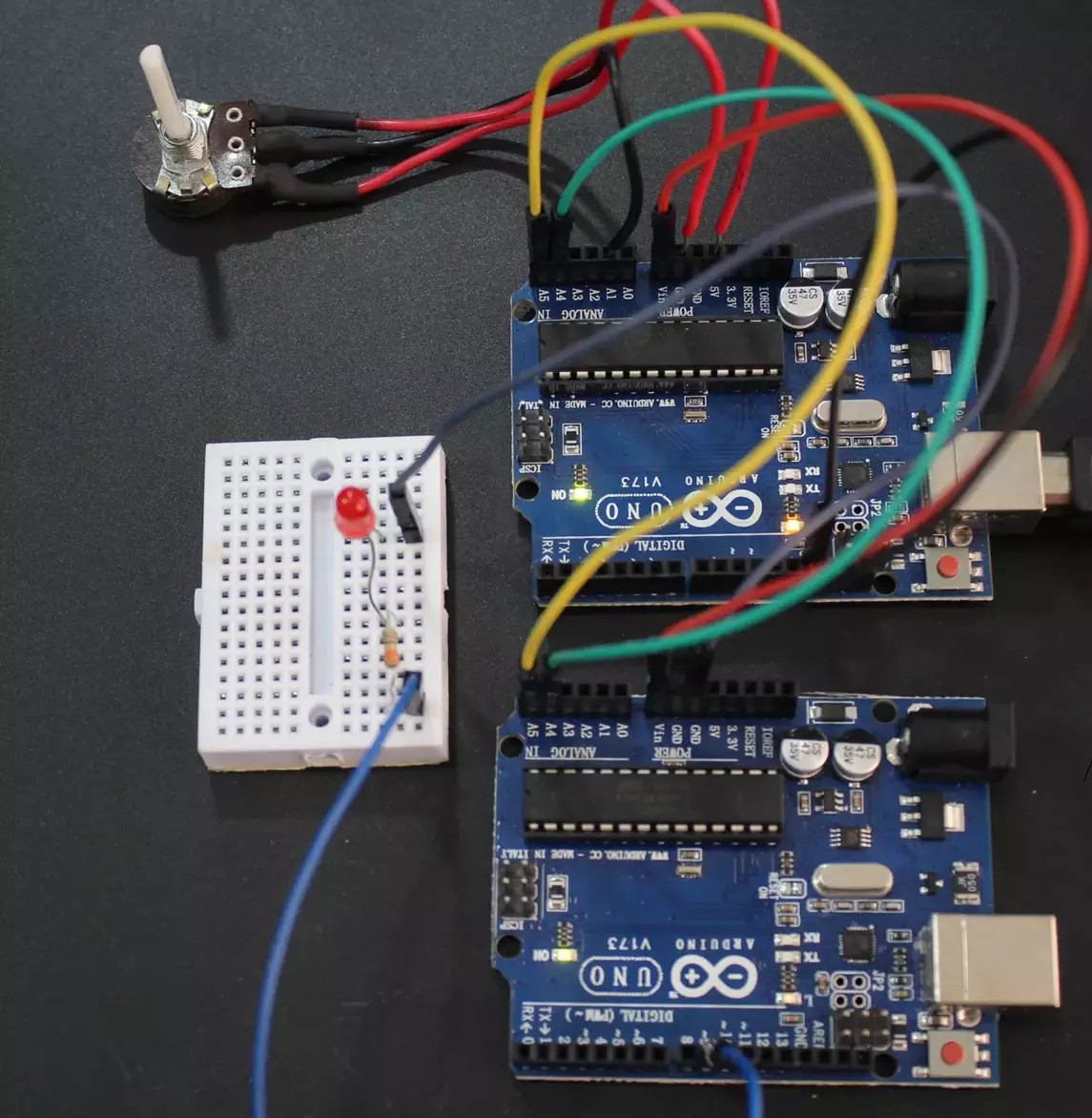
56. LED Brightness Control Using I2C
In this task, we are implementing a system where a potentiometer connected to the Master microcontroller is rotated, and the Slave microcontroller controls the brightness of an LED connected to it using I2C communication.
For this, we have to establish I2C communication between the master and the slave.
Understanding I²C Protocol
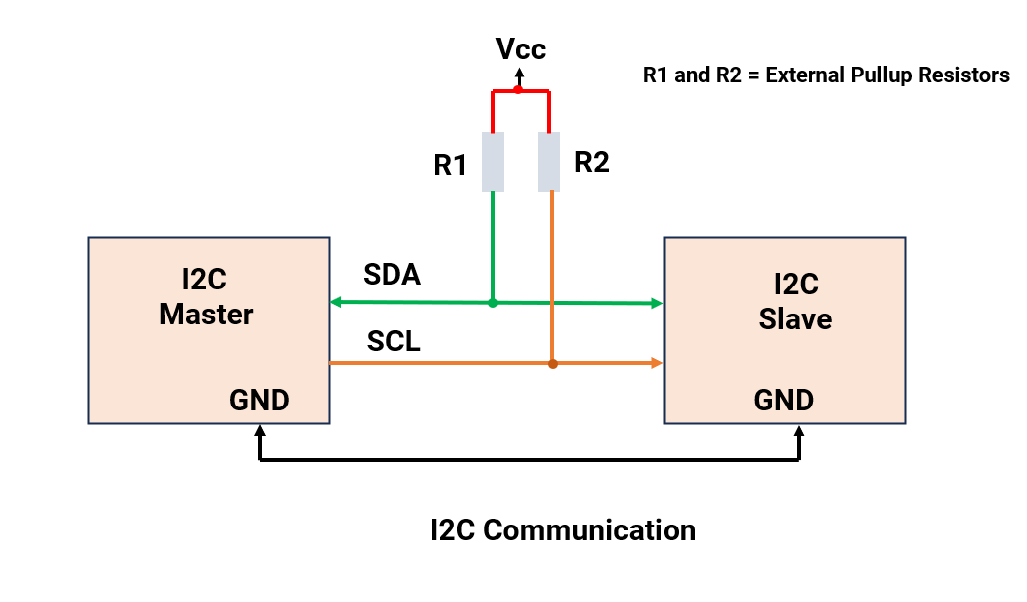
I²C (Inter-Integrated Circuit) is a serial communication protocol that uses only two lines
- SDA (Serial Data) – Transfers data between devices.
- SCL (Serial Clock) – Provides clock signal (controlled by the Master).
Key characteristics:
- Master-Slave Architecture: The Master initiates and controls communication; Slaves respond.
- Open-Drain Configuration: Devices can only pull the line LOW, so pull-up resistors are mandatory on both SDA and SCL.
- Addressing:
- Each Slave has a unique 7-bit address (0x08 to 0x77 for general usage).
- In this task, we will use a 0x08 slave address.
- Speed: Standard mode is 100 kHz, which is suitable for this task as LED brightness control is not time-critical.
Important Design Considerations
- Pull-Up Resistors:
- Required because of the open-drain nature of I²C lines.
- Typical value: 4.7 kΩ for 100 kHz communication (can range from 4.7 kΩ to 10 kΩ depending on bus capacitance and speed).
- Pull-Up Voltage:
- Use 5V if both microcontrollers operate at 5V.
- Use 3.3V if one or both microcontrollers operate at 3.3V.
- Common Ground: Both boards must share a common GND for proper communication.
Hardware Setup
- Master Connection:
- Connect the potentiometer’s VCC to 3.3V/5V (as per MCU logic level), GND to ground, and the wiper to any analog input GPIO pin on the Master microcontroller.
- Slave Connection
- Connect the LED’s anode to a PWM-capable GPIO pin on the Slave microcontroller through a suitable current-limiting resistor
- Connect the LED’s cathode to ground.
- I²C Connections:
- Master SDA → Slave SDA
- Master SCL → Slave SCL
- 4.7 kΩ external pull-up resistors between VCC and SDA/SCL.
- Common GND between Master and Slave.
Note: When interfacing I²C devices operating at different voltages (e.g., 5 V ↔ 3.3 V), always use a voltage level shifter to ensure safe logic levels and reliable communication.
So, by connecting and configuring the master and slave devices and the I2C communication, we can implement the task.
Below are the solutions to the given task using different microcontrollers
- STM32
- ESP32
- Arduino UNO
We’re using an STM32 NUCLEO-F103RB board for both as master and slave, which operates at a 3.3V logic level.
A) STM32 as a master:
Key Peripherals Used:
- I2C1 – Facilitates I2C communication between the Master and Slave boards.
- ADC1 – Reads the analog voltage from the potentiometer
- USART2 – Provides serial communication with a terminal for displaying debug messages.
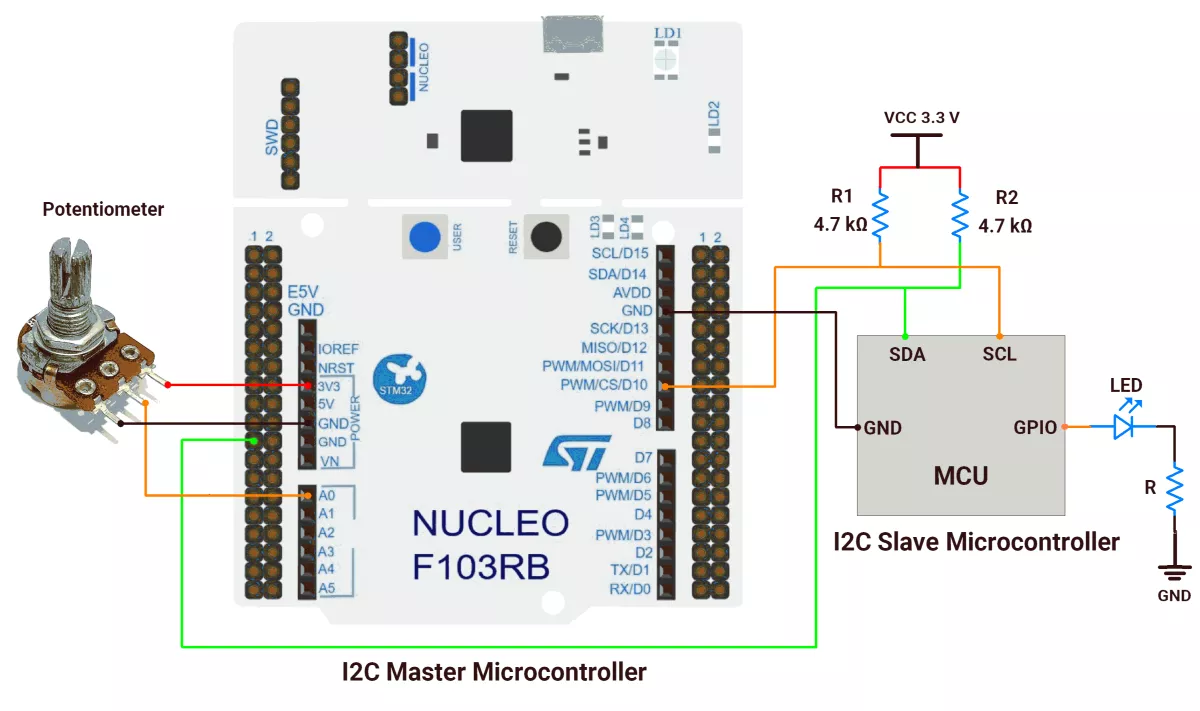
STM32 Hardware Connection
- Connect the middle pin of the potentiometer to PA0 (A0), and the outer pins to VCC and GND.
- Connect PB6 → SCL pin of the Slave microcontroller.
- Connect PB7 → SDA pin of the Slave microcontroller.
- Ensure a shared GND between the Master and Slave boards.
- Place 4.7 kΩ pull-up resistors between VCC and each of the SDA and SCL lines.
- Connect the USB cable to the PC for power and UART communication.
Circuit Diagram
STM32 Firmware Implementation
Project Setup in STM32CubeIDE
- Create a Project
- Open STM32CubeIDE, start a new project, and select the NUCLEO-F103RB board.
- Basic Configuration (via CubeMX inside CubeIDE)
- Clock: Use the default HSI oscillator with PLL enabled (as configured in
SystemClock_Config). - GPIO:
- Enable clocks for PORTA, PORTB, PORTC, and PORTD.
- Configure PA0 as an analog input.
- ADC1 (Analog Input Source)
- Resolution: 12-bit (0–4095 range).
- Conversion mode: Single, software-triggered.
- Channel: ADC_CHANNEL_0 (PA0).
- I2C1: I2C mode (Standard mode, 100kHz clock).
- USART2: Enabled at 115200 baud, 8-N-1, for debugging/expansion if needed.
- Clock: Use the default HSI oscillator with PLL enabled (as configured in
- Code Generation
- CubeMX will automatically generate all the startup code, including:
HAL_Init()→ Initializes HAL and system tick.SystemClock_Config()→ Configures system clock (HSI + PLL).MX_GPIO_Init()→ Initializes GPIO ports.MX_ADC1_Init()→ Configures ADC1 for analog input.MX_USART2_UART_Init()→ Configures UART2.MX_I2C1_Init()→ Configures I2C1.
- This code sets up the hardware and prepares the project for firmware development, so we only need to add our application logic in the user code sections
- CubeMX will automatically generate all the startup code, including:
Code Snippets from main.c
I2C Initialization (MX_I2C1_Init)
hi2c1.Instance = I2C1;
hi2c1.Init.ClockSpeed = 100000;       // 100kHz
hi2c1.Init.DutyCycle = I2C_DUTYCYCLE_2;
hi2c1.Init.AddressingMode = I2C_ADDRESSINGMODE_7BIT;
if (HAL_I2C_Init(&hi2c1) != HAL_OK) {
  Error_Handler();
}
Initializes I2C1 peripheral with 100kHz clock speed, standard duty cycle, and 7-bit addressing mode.
ADC Initialization (MX_ADC1_Init)
hadc1.Instance = ADC1;
hadc1.Init.ScanConvMode = ADC_SCAN_DISABLE;
hadc1.Init.ContinuousConvMode = DISABLE;
hadc1.Init.ExternalTrigConv = ADC_SOFTWARE_START;
if (HAL_ADC_Init(&hadc1) != HAL_OK) Error_Handler();

sConfig.Channel = ADC_CHANNEL_0;
sConfig.Rank = ADC_REGULAR_RANK_1;
sConfig.SamplingTime = ADC_SAMPLETIME_239CYCLES_5;
if (HAL_ADC_ConfigChannel(&hadc1, &sConfig) != HAL_OK) Error_Handler();
Initializes ADC1 in single-channel mode, software-triggered conversion, with Channel 0 configured for a 239.5-cycle sampling time.
Private defines and variables
#define SLAVE_ADDRESS (0x08 << 1)  // STM32 I2C uses 7-bit addr shifted left by 1

uint16_t adcMaxValue = 4095;      // 12-bit ADC max value (2^12 - 1)
uint16_t adcValue = 0;            // Stores current ADC reading
uint8_t i2cData[4];               // Buffer for I2C data transmission
Defines I2C slave address (0x08 in 7-bit format) and declares variables for ADC simulation (12-bit resolution) and I2C data buffer.
Main Loop Logic
while (1) {
  HAL_ADC_Start(&hadc1);
  HAL_ADC_PollForConversion(&hadc1, 20);
  adcValue = HAL_ADC_GetValue(&hadc1);

  // Break 16-bit values into 8-bit low/high bytes (little endian)
  i2cData[0] = adcMaxValue & 0xFF;         // Low byte
  i2cData[1] = (adcMaxValue >> 8) & 0xFF;  // High byte
  i2cData[2] = adcValue & 0xFF;            // Low byte
  i2cData[3] = (adcValue >> 8) & 0xFF;     // High byte

  HAL_I2C_Master_Transmit(&hi2c1, SLAVE_ADDRESS, i2cData, 4, HAL_MAX_DELAY);

  HAL_Delay(10);  // Delay 10 milli seconds
}
In this code, the microcontroller continuously reads an ADC value and sends it over I2C along with a predefined adcMaxValue (likely the maximum ADC range, e.g., 4095 for a 12-bit ADC).
Why does sending adcMaxValue work with just adcValue:
- Purpose of
adcMaxValue: It tells the receiver the ADC's full-scale range (e.g., 4095), so the receiver can interpret the rawadcValue(e.g., 2048 = 50% of max). - Data Packing: Both values are split into 8-bit chunks (little-endian) and sent as 4 bytes:
- Bytes 0-1:
adcMaxValue(low byte, then high byte). - Bytes 2-3:
adcValue(low byte, then high byte).
- Bytes 0-1:
- Receiver Side: The receiver reassembles the bytes and uses
adcMaxValueto scaleadcValue(e.g., for percentage calculations).
Key HAL Functions Used
HAL_ADC_Start(&hadc1)- Starts the ADC conversion process.
HAL_ADC_PollForConversion(&hadc1, 20)- Waits (blocks) for ADC conversion to complete (timeout = 20ms).
HAL_ADC_GetValue(&hadc1)- Reads the converted ADC value (12-bit or 16-bit, depending on ADC resolution).
HAL_I2C_Master_Transmit(&hi2c1, SLAVE_ADDRESS, i2cData, 4, HAL_MAX_DELAY)- Sends 4 bytes (adcMaxValue + adcValue) over I2C to a slave device.
HAL_Delay(10)- Adds a 10ms delay to control the loop speed.
Expected Output
- Master: Sends potentiometer ADC values (0–4095) to Slave.
- Slave: Adjusts LED brightness proportionally (PWM duty cycle).
Download Project
The complete STM32CubeIDE project (including .ioc configuration, main.c, and HAL files) is available here:
📥 Download Project
B) STM32 as a slave:
Key Peripherals Used:
- I2C1 – Facilitates I2C communication between the Master and Slave boards.
- TIM3 ( PWM mode ) – Controls the brightness of the LED
- USART2 – Provides serial communication with a terminal for displaying debug messages.
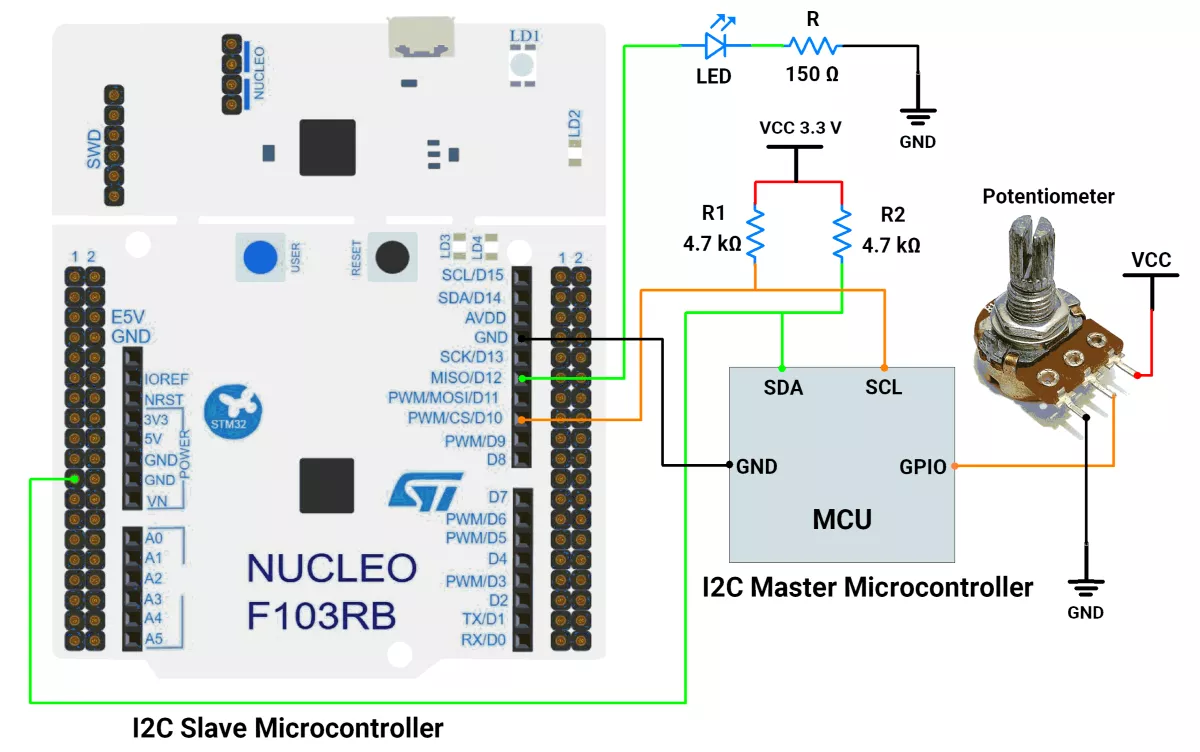
STM32 Hardware Connection
- Connect PB6 → SCL pin of the Master microcontroller
- Connect PB7 → SDA pin of the Master microcontroller
- Ensure a shared GND between the Master and Slave boards
- Place 4.7 kΩ pull-up resistors between VCC and each of the SDA and SCL lines
- Connect an LED to the TIM3_CH1 PWM output pin PA6(D12) for brightness control
- Connect the USB cable to the PC for power and UART communication
Circuit Diagram
STM32 Firmware Implementation
Project Setup in STM32CubeIDE
- Create a Project
- Open STM32CubeIDE, start a new project, and select the NUCLEO-F103RB board.
- Basic Configuration (via CubeMX inside CubeIDE)
- Clock: Use the default HSI oscillator with PLL enabled (as configured in
SystemClock_Config). - GPIO: Enable clocks for PORTA, PORTB, PORTC, and PORTD.
- I2C1 Configuration:
- Mode: I2C Slave (7-bit address 0x08).
- Clock Speed: 100kHz (must match master).
- Primary slave address: 0x08
- Interrupt: Enable I2C Event Interrupt in NVIC for non-blocking reception.
- TIM3 Configuration:
- PWM Generation Channel 1
- Prescaler: 0
- Counter Period: 4095 (12-bit resolution)
- USART2: Enabled at 115200 baud, 8-N-1, for debugging/expansion if needed.
- Clock: Use the default HSI oscillator with PLL enabled (as configured in
- Code Generation
- CubeMX will automatically generate all the startup code, including:
HAL_Init()→ Initializes HAL and system tick.SystemClock_Config()→ Configures system clock (HSI + PLL).MX_GPIO_Init()→ Initializes GPIO ports.MX_USART2_UART_Init()→ Configures UART2.MX_I2C1_Init()→ Configures I2C1.MX_TIM3_Init()→ Configures TIM3 for PWM output.
- This code sets up the hardware and prepares the project for firmware development, so we only need to add our application logic in the user code sections
- CubeMX will automatically generate all the startup code, including:
Code Snippets from main.c
I2C Initialization (MX_I2C1_Init)
hi2c1.Instance = I2C1;
hi2c1.Init.ClockSpeed = 100000;       // 100kHz
hi2c1.Init.DutyCycle = I2C_DUTYCYCLE_2;
hi2c1.Init.OwnAddress1 = 16;          // 0x08 << 1
hi2c1.Init.AddressingMode = I2C_ADDRESSINGMODE_7BIT;
if (HAL_I2C_Init(&hi2c1) != HAL_OK) {
  Error_Handler();
}
Configures I2C1 peripheral to operate at 100 kHz in 7-bit addressing mode with a slave address (0x08 << 1). Ensures proper bus timing and address recognition before enabling communication.
PWM Initialization (MX_TIM3_Init)
htim3.Instance = TIM3;
htim3.Init.Prescaler = 0;
htim3.Init.Period = 4095;             // 12-bit resolution
if (HAL_TIM_PWM_Init(&htim3) != HAL_OK) {
  Error_Handler();
}
Sets up TIM3 in PWM mode with no prescaler and a 4095-period for 12-bit resolution. This enables fine-grained control over LED brightness.
Private Defines and Variables
#define I2C_SLAVE_ADDRESS 0x08
uint8_t i2cRxBuffer[4];               // Buffer for I2C data reception
Declares I2C_SLAVE_ADDRESS for clarity and a 4-byte i2cRxBuffer to store incoming data from the I2C master.
I2C Reception Callback
void HAL_I2C_SlaveRxCpltCallback(I2C_HandleTypeDef *hi2c)
{

  // Reconstruct 16-bit values from received bytes
  uint16_t adcMaxValue = (i2cRxBuffer[1] << 8) | i2cRxBuffer[0];
  uint16_t adcValue    = (i2cRxBuffer[3] << 8) | i2cRxBuffer[2];

  // Calculate brightness proportionally
  uint16_t brightness = 0;
  if (adcMaxValue > 0) {
    brightness = (uint32_t)adcValue * 4095 / adcMaxValue;
  }

  // Set PWM duty cycle
  __HAL_TIM_SET_COMPARE(&htim3, TIM_CHANNEL_1, brightness);

  // Prepare for next reception
  HAL_I2C_Slave_Receive_IT(hi2c, i2cRxBuffer, 4);
}
Triggered on data reception, it reconstructs two 16-bit values (ADC max and current reading), calculates proportional PWM duty cycle, updates brightness, and re-arms the I2C receive interrupt.

Main loop logic
  HAL_TIM_PWM_Start(&htim3, TIM_CHANNEL_1);  // Start PWM
  HAL_I2C_Slave_Receive_IT(&hi2c1, i2cRxBuffer, 4);  // Start I2C reception

  while (1) {
    // Main loop - all processing happens in interrupts
  }
At startup, PWM generation on TIM3 channel 1 and non-blocking I2C reception on I2C1 are both activated. The infinite while (1) loop remains empty because all real-time processing—data reception, and PWM adjustment—occurs inside interrupt service routines.
Data Processing Explanation
- The master sends 4 bytes:
- Bytes 0-1: ADC maximum value (little-endian)
- Bytes 2-3: Current ADC reading (little-endian)
- The slave reconstructs these into 16-bit values
- Brightness is calculated as:
brightness = (adcValue * 4095) / adcMaxValue - The result is applied to TIM3's PWM duty cycle
Key HAL Functions Used
HAL_I2C_Slave_Receive_IT()
Starts non-blocking I2C reception in slave modeHAL_I2C_SlaveRxCpltCallback()
Called automatically when I2C reception completes__HAL_TIM_SET_COMPARE()
Updates the PWM duty cycle directlyHAL_TIM_PWM_Start()
Enables PWM output on the specified channel
Expected Output
- Slave: Receives ADC values (0-4095) from Master over I2C
- Slave: Converts received values to PWM duty cycle (0-4095)
- LED: Changes brightness proportionally to the received ADC value
- Onboard LD2: Toggles on each successful I2C reception
Download Project
The complete STM32CubeIDE project (including .ioc configuration, main.c, and HAL files) is available here:
📥 Download Project
We are using the ESP32 DevKit v4 development board and programming it using the Arduino IDE.
- Before uploading, make sure to select “ESP32 Dev Module” as the board to ensure correct settings and compatibility.
In both ESP32 master and slave codes, the Wire.h library is used for I²C communication.
Solution of the given task:
- ESP32 as Master
- ESP32 as Slave
A) ESP32 Solution as Master
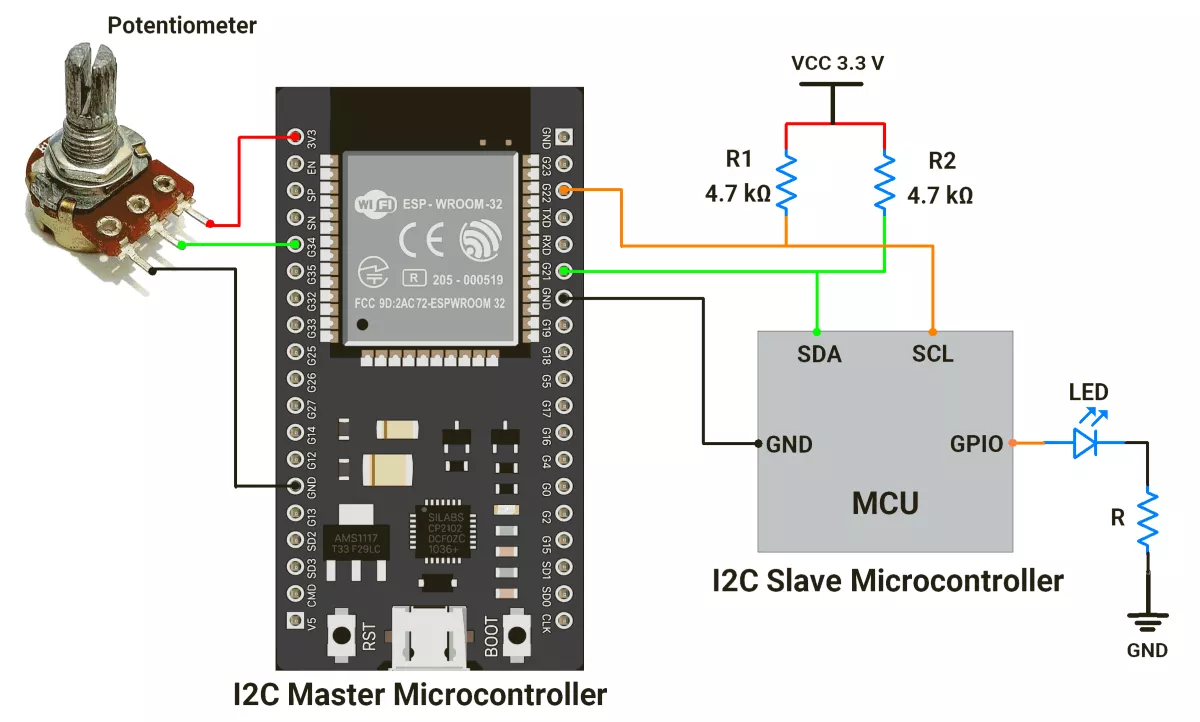
ESP32 Circuit Connection
- Interface potentiometer with GPIO pin 34.
- Place 4.7 kΩ pull-up resistors between VCC and each of the SDA and SCL lines.
- Interface the LED to the slave device with a current-limiting resistor.
ESP32 Firmware Implementation
The I²C slave can be any microcontroller (e.g., Arduino UNO, ESP32, STM32) programmed with the same slave address (0x08). Only the slave code changes.
Master Code
#include <Wire.h>
#include <driver/gpio.h>

#define potPin 34            // Potentiometer input pin
#define slaveAddress 0x08    // I2C slave address
#define MAX_ADC_VALUE 4095   // Maximum ADC value (12-bit)

uint16_t brightness;         // Current potentiometer reading
uint16_t previousvalue;      // Previous potentiometer reading
uint8_t error;               // I2C transmission error flag

// Disable ESP32’s internal pull-ups/pull-downs on I2C pins
void ensureNoInternalPullups(int sda = 21, int scl = 22) {
  gpio_pullup_dis((gpio_num_t)sda);
  gpio_pulldown_dis((gpio_num_t)sda);
  gpio_pullup_dis((gpio_num_t)scl);
  gpio_pulldown_dis((gpio_num_t)scl);
}

void setup() {
  Wire.begin();              // Initialize ESP32 as I2C master
  ensureNoInternalPullups(); // Disable internal pulls
  Serial.begin(115200);
}

void loop() {
  brightness = analogRead(potPin);   // Read potentiometer value
  Serial.println(brightness);        // Debug print

  // Send only if value has changed
  if (brightness != previousvalue) {
    Wire.beginTransmission((uint8_t)slaveAddress);
    Wire.write(MAX_ADC_VALUE);       // Send max ADC value (LSB)
    Wire.write(MAX_ADC_VALUE >> 8);  // Send max ADC value (MSB)
    Wire.write(brightness);          // Send brightness (LSB)
    Wire.write(brightness >> 8);     // Send brightness (MSB)

    error = Wire.endTransmission(true); // End transmission
    if (error == 0) {
      Serial.println("Successful data transmission");
    } else {
      Serial.println("ERROR in data transmission");
      Serial.println(error);
    }
    previousvalue = brightness;      // Update previous value
  }
  delay(1); // Small delay for stable communication
}
Code Explanation
- ESP32 is set up as an I²C master.
- It reads the potentiometer value from pin 34 (range: 0–4095).
- It only sends data to the slave if the value has changed.
- When sending, it breaks two numbers into bytes
- Max ADC value (4095 → 2 bytes).
- Current reading (potentiometer value → 2 bytes).
- These 4 bytes go to the slave device over I²C.
- After transmission, it checks:
- If successful → prints “Successful data transmission.”
- If failed → prints an error code.
- A tiny delay(1) is added for smoother communication.
B) ESP32 Solution as Slave
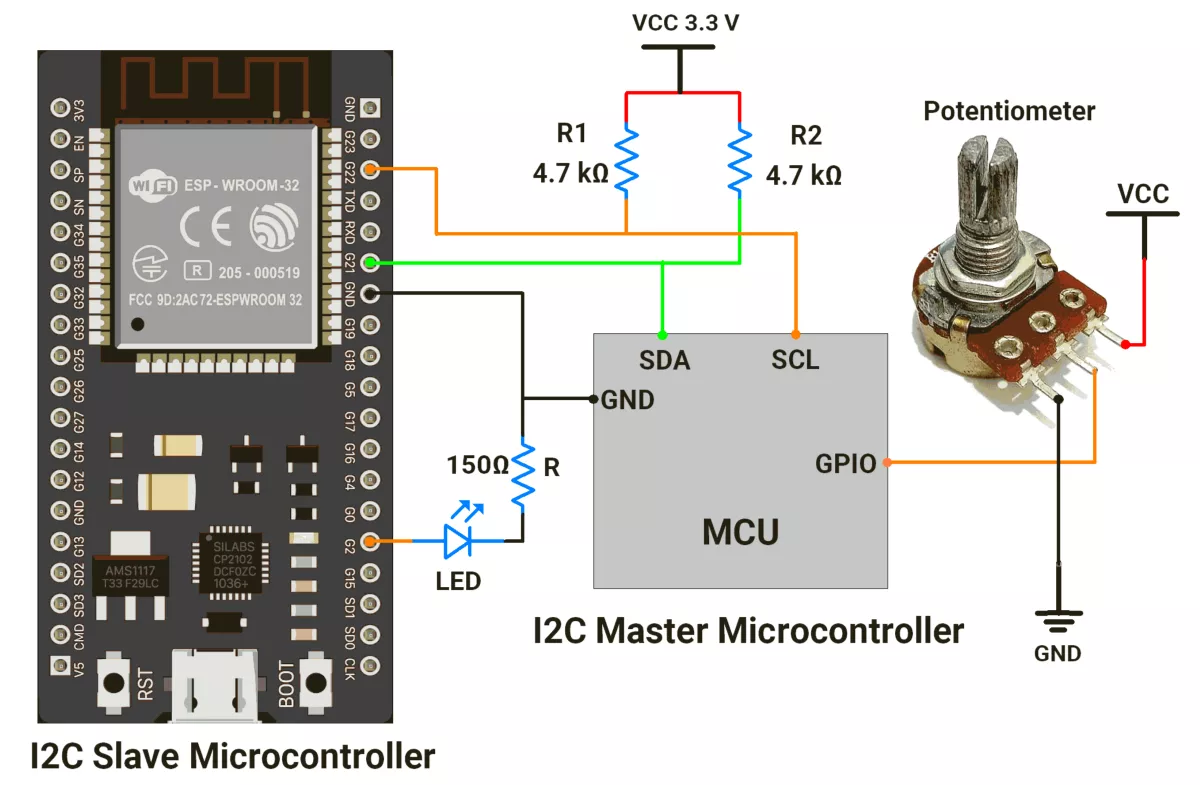
ESP32 Circuit Connection
- Interface LED with GPIO pin 2 with a Current-limiting resistor of 150 ohms.
- Place 4.7 kΩ pull-up resistors between VCC and each of the SDA and SCL lines.
- Interface push button switch to the GPIO pin of the Master controller.
ESP32 Firmware Implementation
- The I²C slave can be any microcontroller (e.g., Arduino UNO, ESP32, STM32) programmed with the same slave address (0x08)—only the master code changes.
Slave Code
// I2C Slave code for ESP32 that adjusts LED brightness based on data from Master


#include <Wire.h>
#include <driver/gpio.h>


#define slaveAddress 0x08  // I2C slave address
#define LED_PIN 2          // LED connected to GPIO2
#define PWM_FREQ 1000      // PWM frequency: 1 kHz
#define PWM_RES_BIT 12     // PWM resolution: 12-bit (0–4095)
#define PWM_RES 4095


uint16_t brightness = 0;  // Variable to store mapped LED brightness


// Function to disable ESP32's internal pull-ups/pull-downs on I2C pins
void ensureNoInternalPullups(int sda = 21, int scl = 22) {
  gpio_pullup_dis((gpio_num_t)sda);
  gpio_pulldown_dis((gpio_num_t)sda);
  gpio_pullup_dis((gpio_num_t)scl);
  gpio_pulldown_dis((gpio_num_t)scl);
}


void setup() {
  Serial.begin(115200);


  // Initialize ESP32 as I2C slave
  Wire.begin((uint8_t)slaveAddress);
  ensureNoInternalPullups();
  Wire.onReceive(receiveEvent);  // Register callback for incoming data


  // Set up LED PWM (Core v3.x function: ledcAttach)
  ledcAttach(LED_PIN, PWM_FREQ, PWM_RES_BIT);


  Serial.setDebugOutput(true);
}


void loop() {
  // Nothing here, work is interrupt-driven via I2C callback
}


// I2C data receive handler
void receiveEvent(int bytesReceived) {
  if (bytesReceived == 4) {  // Expecting 4 bytes
    // Read data sent by master
    uint8_t adcMaxValueLow = Wire.read();
    uint8_t adcMaxValueHigh = Wire.read();
    uint8_t adcValueLow = Wire.read();
    uint8_t adcValueHigh = Wire.read();


    // Reconstruct 16-bit values
    uint16_t adcMaxValue = (adcMaxValueHigh << 8) | adcMaxValueLow;
    uint16_t adcValue = (adcValueHigh << 8) | adcValueLow;


    Serial.println(adcValue);  // Debug print


    // Map ADC value into PWM range
    if (adcMaxValue > 0) {
      brightness = map(adcValue, 0, adcMaxValue, 0, PWM_RES);
    }


    // Set LED brightness
    ledcWrite(LED_PIN, brightness);
  }
}
Code Explanation
- The ESP32 is running as an I²C slave with address 0x08.
- The master device (maybe another ESP32 or Arduino) sends 4 bytes:
- First two bytes = the maximum ADC range of that master.
- Next two bytes = the actual ADC reading (like from a potentiometer).
- When the slave receives those 4 bytes, it maps the ADC reading to a PWM value (0–4095).
brightness = map(adcValue, 0, adcMaxValue, 0, PWM_RES); - Finally, it writes the PWM value to the LED, so the LED brightness matches the potentiometer position on the master side.
ledcWrite(LED_PIN, brightness);
We are using the Arduino UNO development board and programming it using the Arduino IDE.
- Before uploading, make sure to select “Arduino UNO” as the board to ensure correct settings and compatibility.
In both Arduino UNO master and slave codes, the Wire.h library is used for I²C communication.
I²C Pins Of Arduino UNO
- SDA → A4
- SCL → A5
Solution of the given task:
- Arduino UNO as Master
- Arduino UNO as Slave
A) Arduino UNO as a master
First, let's establish the hardware connection.
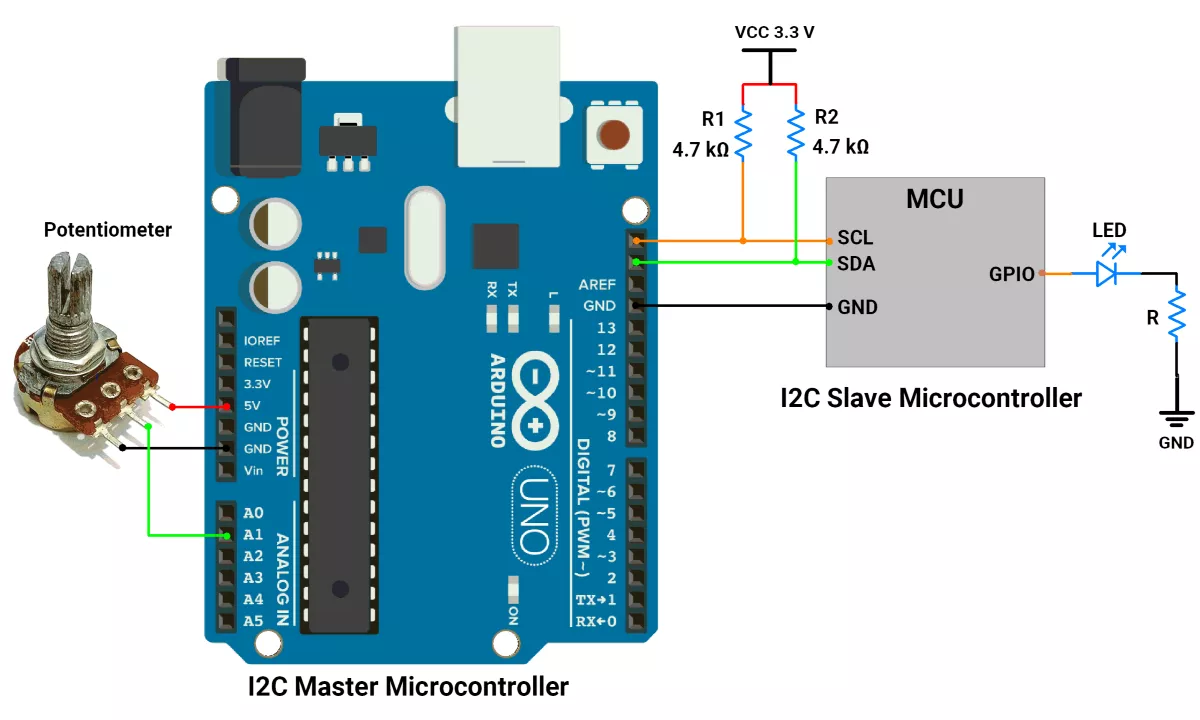
Arduino UNO Hardware Connection
- Interface potentiometer with GPIO pin A1.
- Place 4.7 kΩ external pull-up resistors between VCC and each of the SDA and SCL lines.
- Interface the LED to the slave device with a current-limiting resistor.
Circuit Diagram
Code (Master)
#include <Wire.h>

#define potPin A1
#define slaveAddress 0x08  // Slave address

#define MAX_ADC_VALUE 1023

uint16_t brightness;
uint16_t previousvalue;

uint8_t error;

void setup() {
  // Initialize Arduino UNO as I2C master
  Wire.begin();

  // Disable internal pull-ups on SDA/SCL
  pinMode(A4, INPUT);     // SDA
  pinMode(A5, INPUT);     // SCL
  digitalWrite(A4, LOW);  // ensure pull-up is off
  digitalWrite(A5, LOW);  // ensure pull-up is off

  Serial.begin(115200);
}

void loop() {

  // It map the potentiometer value(0 to 1023) to PWM value(0 to 255) i.e 1023/255 = ~4
  brightness = analogRead(potPin);


  if (brightness != previousvalue) {
    Wire.beginTransmission(slaveAddress);
    Wire.write(MAX_ADC_VALUE);
    Wire.write(MAX_ADC_VALUE >> 8);
    Wire.write(brightness);  // write data in i2c buffer
    Wire.write(brightness >> 8);

    error = Wire.endTransmission();  // send brightness value using i2c
    if (error == 0) {
      Serial.println("Successful data transmission");
    } else {
      Serial.println("ERROR in data transmission");
    }
    previousvalue = brightness;
  }
  delay(10);  // time duration for proper communication
}
Code Explanation (Master)
Wire.begin(): Initializes Arduino UNO as I²C master.- Disable Internal Pull-ups:
pinMode(A4, INPUT)andpinMode(A5, INPUT)withdigitalWrite(A4, LOW)anddigitalWrite(A5, LOW)ensure that internal pull-ups are disabled because external 4.7 kΩ pull-up resistors are used for SDA and SCL lines. - Analog Reading:
brightness = analogRead(potPin);reads the potentiometer value (0–1023). - Change Detection:
The conditionif (brightness != previousvalue)ensures data is sent only when the potentiometer value changes, reducing unnecessary I²C traffic. - Data Transmission:
Wire.beginTransmission(slaveAddress)starts I²C communication with the slave.Wire.write(MAX_ADC_VALUE);Wire.write(MAX_ADC_VALUE>>8); sends the reference maximum ADC value (two bytes).Wire.write(brightness); Wire.write(brightness>>8);sends the current potentiometer value (two bytes).Wire.endTransmission()completes the transaction and returns an error code (0 = success).
- Error Handling:
If error == 0, print "Successful data transmission"; otherwise, print "ERROR in data transmission" to the Serial Monitor. - Delay:
delay(10);adds a short pause to maintain proper communication timing.
B) Arduino UNO as a slave
First, let's establish the hardware connection.
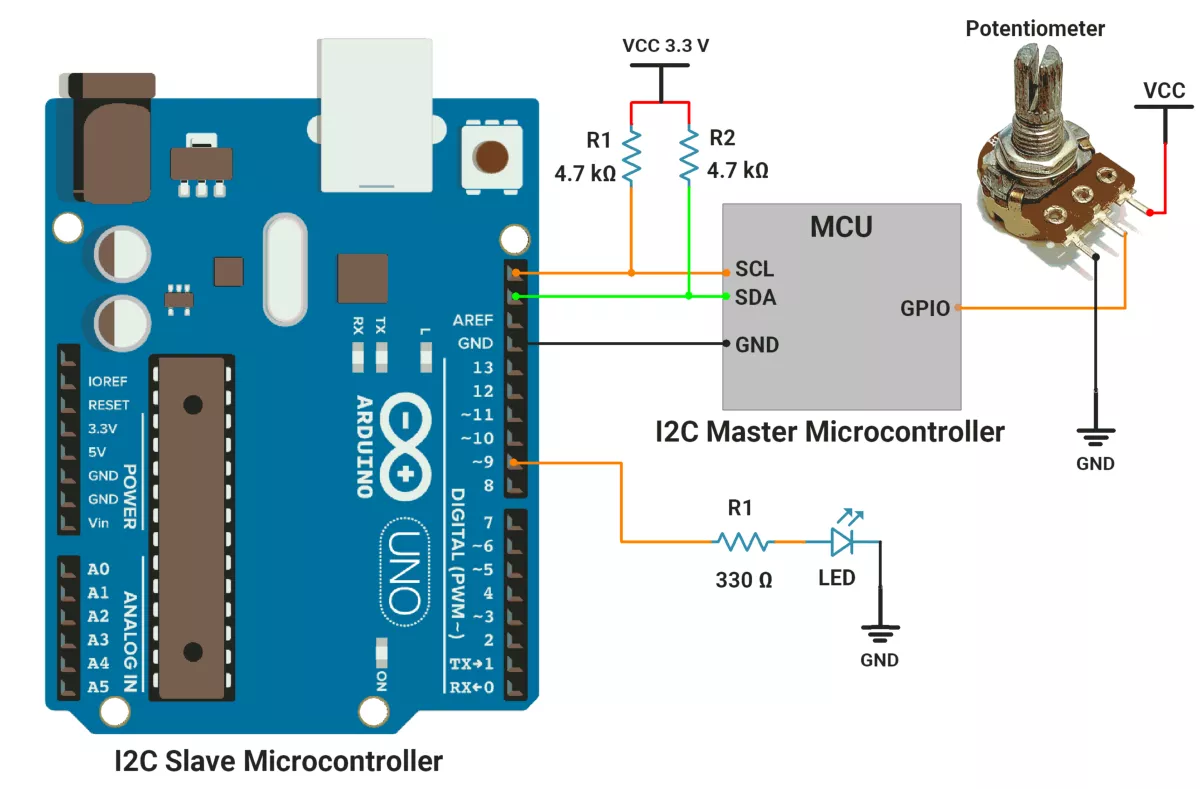
Arduino UNO Hardware Connection
- Interface LED with a GPIO pin 9 with a Current-limiting resistor of 330 ohms.
- Place 4.7 kΩ external pull-up resistors between VCC and each of the SDA and SCL lines.
- Interface push button switch to the GPIO pin of the Master controller.
Circuit Diagram
Arduino UNO Firmware Implementation
Code(Slave)
#include <Wire.h>

#define slaveAddress 0x08
#define ledPin 9

void setup() {

  // Initialize arduino as I2C slave (Slave address is 0x08)
  Wire.begin(slaveAddress);

  // Disable internal pull-ups on SDA/SCL
  pinMode(A4, INPUT);     // SDA
  pinMode(A5, INPUT);     // SCL
  digitalWrite(A4, LOW);  // ensure pull-up is off
  digitalWrite(A5, LOW);  // ensure pull-up is off

  Wire.onReceive(receiveEvent);
  pinMode(ledPin, OUTPUT);
}

void loop() {
  // Nothing to do in loop
}

void receiveEvent(int bytesReceived) {
  if (bytesReceived == 4) {
    uint8_t adcMaxValueLow = Wire.read();
    uint8_t adcMaxValueHigh = Wire.read();
    uint8_t adcValueLow = Wire.read();
    uint8_t adcValueHigh = Wire.read();

    uint16_t adcMaxValue = (adcMaxValueHigh << 8) | adcMaxValueLow;
    uint16_t adcValue = (adcValueHigh << 8) | adcValueLow;

    uint8_t brightness = 0;
    if (adcMaxValue > 0) {
      brightness = map(adcValue, 0, adcMaxValue, 0, 255);
    }

    analogWrite(ledPin, brightness);
  }
}
Code Explanation (Slave)
Wire.begin(slaveAddress):
Initializes Arduino as an I²C slave with the address 0x08.- Disable Internal Pull-ups:
pinMode(A4, INPUT)andpinMode(A5, INPUT)withdigitalWrite(A4, LOW)anddigitalWrite(A5, LOW)ensure internal pull-ups on SDA and SCL are disabled because external 4.7 kΩ pull-up resistors are used. Wire.onReceive(receiveEvent):
Registers receiveEvent as the callback function that executes whenever data is received from the master.pinMode(ledPin, OUTPUT):
Configures pin 9 as an output to drive the LED using PWM.
receiveEvent() Function
- Data Check:
if (bytesReceived == 4)ensures that the master sends exactly 4 bytes (two foradcMaxValue, two for adcValue). - Read Data:
adcMaxValueLowandadcMaxValueHighstore the two bytes ofMAX_ADC_VALUE.adcValueLowandadcValueHighstore the two bytes of the current potentiometer value.
- Combine Bytes into 16-bit Values:
adcMaxValue = (adcMaxValueHigh << 8) | adcMaxValueLow;adcValue = (adcValueHigh << 8) | adcValueLow;
- Map ADC to PWM:
If adcMaxValue > 0, use map(adcValue, 0, adcMaxValue, 0, 255)to scale the potentiometer value to a PWM range (0–255). - Analog Output:
analogWrite(ledPin, brightness); applies the calculated PWM duty cycle to control LED brightness.
Output
Hardware Setup