
65. Optocoupler for MCU Signal Isolation
1. Component Purpose
The MCU runs on 3.3V; the relay driver runs on 24V. If these two sections share a direct electrical connection, noise, ground loops, and voltage spikes from the relay side can damage the MCU.
An optocoupler provides galvanic isolation — the signal transfers across an internal light barrier (LED → phototransistor) with no electrical connection. Even if the relay side has a catastrophic fault, the MCU side is completely protected.
Required: Transistor Output · 1-Ch · ≥3750Vrms isolation · CTR ≥50% · Vout ≥30V · DIP-4 · Through Hole
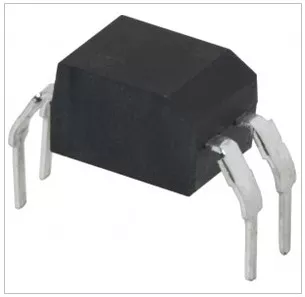
2. How to Find It on DigiKey
Go to DigiKey.com → Isolators → Optoisolators → Transistor, Photovoltaic Output
Apply these filters:
- Output Type → Transistor
- Number of Channels → 1
- Voltage - Isolation → 3750Vrms or higher
- Current Transfer Ratio (Min) → 50% or higher
- Voltage - Output (Max) → 30V or higher
- Package / Case → 4-DIP
- Part Status → Active
Tip: CTR (Current Transfer Ratio) = output current / input current × 100%. A CTR of 50% means 5mA input produces at least 2.5mA output. Higher CTR lets you drive the input LED at lower current.
3. Key Specifications & What They Mean
| Specification | Required | Why |
|---|---|---|
| Output Type | Transistor | Simple ON/OFF signal transfer. |
| Channels | 1 | Single signal path needed. |
| Isolation | ≥3750Vrms | Robust isolation for industrial environments. |
| CTR (Min) | ≥50% | Ensures reliable signal transfer at 5–10mA input. |
| Vout Max | ≥30V | Must handle 24V relay-side voltage. |
| Vf (Typ) | ≤1.5V | Input LED works within 3.3V GPIO headroom. |
| If Max | ≥50mA | LED survives well above 10mA drive. |
| Package | 4-DIP | Through hole for prototyping. |
| Temp Range | −40°C to +105°C | Industrial conditions. |
| RoHS | Yes | Compliance required. |
4. Selecting a Safe, Production-Ready Part
The filtered list will show matching parts. Before you pick one, check: Is it Active? Is stock available? Is the manufacturer reputable? Is a datasheet available?
Full checklist: How to Select a Safe, Production-Ready Component — EWskills Guide
5. Filtered DigiKey Link
➡ View Matching Parts — Transistor, 1-Ch, ≥3750Vrms, CTR≥50%, DIP-4