72. PathFinder Compass
Overview
- In the given task, we have to create a device that can calculate the distance and direction between the camp location and the soldier's location.
- Instead of an Army GPS device, we are going to send a GPS string via a Serial terminal to avoid hardware complexity.
- Communication between the serial terminal and the MCU occurs via UART (Universal Asynchronous Receiver-Transmitter).
- Since the GPS module operates at a baud rate of 9600, it is essential to set the baud rate of both the MCU and the serial monitor to 9600 to ensure proper communication.
Hardware Connection
We have to connect the MCU board to the PC using a USB cable.
Firmware
- In the given task, we have created our own custom GPS string.
- String = ”
X=18.532525,Y=73.850457”. - X = Latitude(degree)
- Y = Longitude(degree)
- String = ”
Distance Calculation using the Haversine formula
- We used the Haversine formula for distance calculation using latitude and longitude.
- It’s used to calculate the shortest distance between two points on the Earth’s surface. It provides good accuracy for small distances.
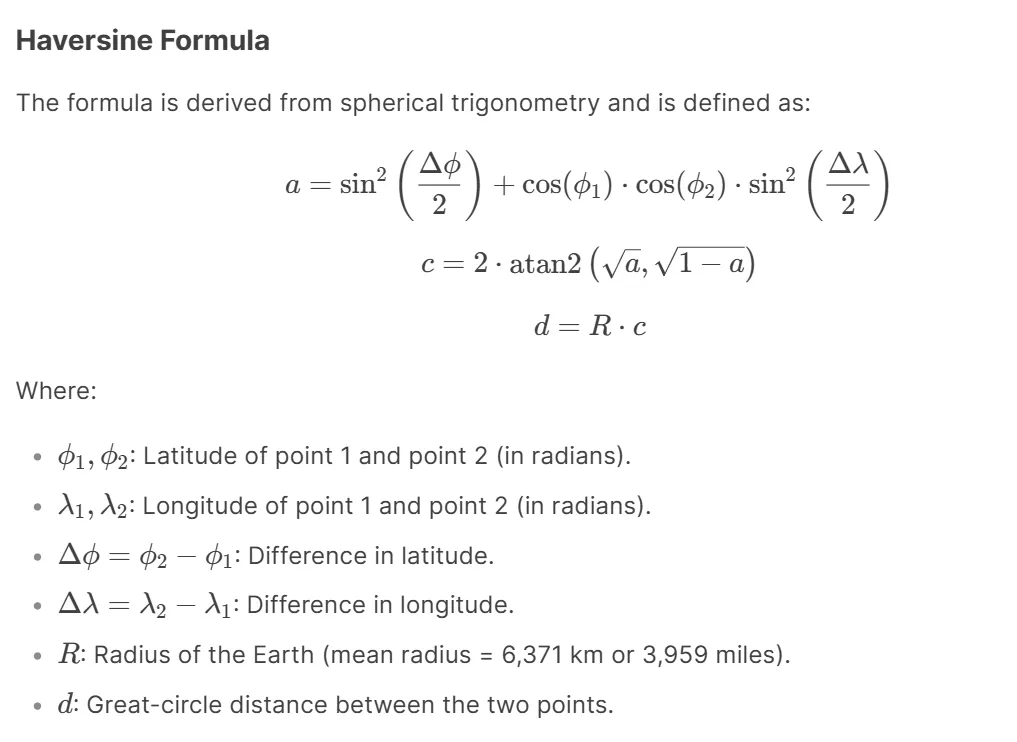
Note: In the given string, X and Y coordinates are in degrees, so we have to convert them into radians.
Direction calculation using the Bearing Angle
- The bearing angle is used for the calculation of the direction between two points.
- The bearing angle (also called the azimuth) is the angle between the north direction and the direction of the line connecting two GPS coordinates, measured clockwise from north.
- It is a crucial concept in navigation, as it provides the direction from one point to another.
- To calculate the direction, we first need to determine the bearing angle using the following formula.
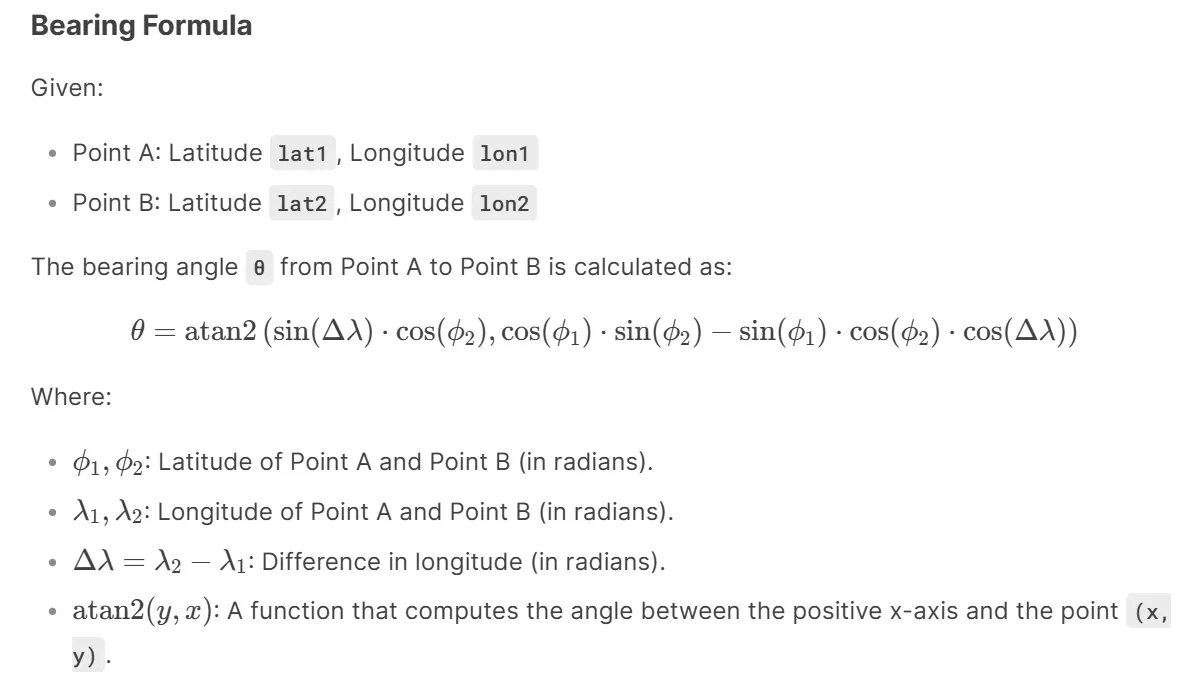
- θ is in radians, so we have to convert it to degrees. And normalize it to [0 to 360].
- Normalize the Bearing Angle
- The bearing angle should be in the range [0°, 360°]. If the result is negative, add 360° to normalize it.
- Depending on the bearing angle, we will decide which direction soldiers should travel.
| Sr.No | Range of angle | Directions |
| 1. | 337.5° to 360° and 0° to 22.5° | North |
| 2. | 22.5° to 67.5°
| Northeast |
| 3. | 67.5° to 112.5°
| East |
| 4. | 112.5° to 157.5° | Southeast |
| 5. | 157.5° to 202.5° | South |
| 6. | 202.5° to 247.5° | Southwest |
| 7. | 247.5° to 292.5°
| West |
| 8. | 292.5° to 337.5° | Northwest |
So, by connecting and configuring the MCU and UART communication, we can implement the task.
Below are the solutions to the given task using different microcontrollers
- STM32
- ESP32
- Arduino UNO
We’re using an STM32 NUCLEO-F103RB board, which operates at a 3.3V logic level.
Key Peripherals Used:
- USART2 –For UART communication between the microcontroller(GPS device) and serial terminal.
STM32 Hardware Connection
- Connect the STM32 NUCLEO-F103RB board to the PC via USB cable for UART communication and Power.
STM32 Firmware Implementation
Project Setup in STM32CubeIDE
- Create a Project
- Open STM32CubeIDE, start a new project, and select the NUCLEO-F103RB board.
- Basic Configuration (via CubeMX inside CubeIDE)
- Clock: Use the default HSI oscillator with PLL enabled (as configured in SystemClock_Config).
- UART2
- Set Mode to Asynchronous
- Configure parameters:
- Baud Rate: 9600
- Word Length: 8 bits
- Parity: None
- Stop Bits: 1
- Hardware Flow Control: None
- Interrupt: Enable UART2 Global Interrupt in NVIC.
- The NUCLEO-F103RB board has USART2 connected to the ST-LINK virtual COM port (PA2 and PA3)
- Code Generation
- CubeMX will automatically generate all the startup code, including:
HAL_Init()→ Initializes HAL and system tick.SystemClock_Config()→ Configures system clock (HSI + PLL).MX_GPIO_Init()→ Initializes GPIO ports.MX_USART2_UART_Init()→ Configures UART2.
- This code sets up the hardware and prepares the project for firmware development, so we only need to add our application logic in the user code sections
- CubeMX will automatically generate all the startup code, including:
Code Snippets from main.c
UART Initialization ( MX_USART2_UART_Init)
huart2.Instance = USART2;
huart2.Init.BaudRate = 9600;
huart2.Init.WordLength = UART_WORDLENGTH_8B;
huart2.Init.StopBits = UART_STOPBITS_1;
huart2.Init.Parity = UART_PARITY_NONE;
huart2.Init.Mode = UART_MODE_TX_RX;
huart2.Init.HwFlowCtl = UART_HWCONTROL_NONE;
huart2.Init.OverSampling = UART_OVERSAMPLING_16;
if (HAL_UART_Init(&huart2) != HAL_OK)
{
  Error_Handler();
}- Purpose: Initializes USART2 peripheral with specified communication parameters
- Configuration Details:
- BaudRate: 9600: Communication speed
- WordLength: 8B: 8 data bits per frame
- StopBits: 1: 1 stop bit
- Parity: NONE: No parity bit
- Mode: TX_RX: Enable both transmit and receive
- HwFlowCtl: NONE: No hardware flow control
- OverSampling: 16: 16x oversampling for better noise immunity
Header Includes, Private Defines, and Variables
A) Includes
#include <math.h>
#include <string.h>
#include <stdio.h>
#include <stdlib.h>
#include <stdbool.h>- Standard C libraries for mathematical operations, string handling, and I/O.
B) Defines
#define CAMP_LATITUDE 18.556283   // Camp Latitude (destination)
#define CAMP_LONGITUDE 73.955067  // Camp Longitude (destination)
#define EARTH_RADIUS_KM 6371      // Earth's radius in kilometers
#define UART_BUFFER_SIZE 30       // Size of UART receive buffer
#define MAX_DISTANCE_STR 20       // Max characters for distance string
#define MAX_MESSAGE_LENGTH 100 // Max characters for output message- Constants for GPS coordinates, Earth's radius, and buffer sizes.
C) Global Variables
static uint8_t uartRxByte;                   // Single received byte via UART
static char uartRxBuffer[UART_BUFFER_SIZE];  // Buffer to store complete UART string
static uint8_t uartRxIndex = 0;              // Index for UART buffer
static bool isStringReceived = false; // Flag indicating complete string received- Variables for UART communication and GPS data processing.
Utility Functions and Callbacks
/**
  * @brief  Prints a string to the serial monitor
  * @param  message: Pointer to the null-terminated string to send
  * @retval None
  */
static void printToSerial(const char* message) {
  HAL_UART_Transmit(&huart2, (uint8_t*)message, strlen(message), HAL_MAX_DELAY);
}- Purpose: Sends a string over UART (e.g., to a serial monitor).
- Parameters: message (null-terminated string).
- Implementation: Uses HAL_UART_Transmit to send data.
/**
  * @brief  Converts a float to a string with specified decimal places
  * @param  value: The float value to convert
  * @param  buffer: Pointer to the output buffer
  * @param  decimalPlaces: Number of decimal places to show
  * @retval None
  */
static void floatToString(float value, char* buffer, uint8_t decimalPlaces) {
  // Handle negative numbers
  bool isNegative = value < 0;
  if (isNegative) {
    value = -value;
  }

  // Extract integer part
  int32_t integerPart = (int32_t)value;
  float fractionalPart = value - integerPart;

  // Convert integer part to string
  char* ptr = buffer;
  if (isNegative) {
    *ptr++ = '-';
  }

  if (integerPart == 0) {
    *ptr++ = '0';
  } else {
    // Reverse the integer digits temporarily
    char temp[10];
    uint8_t i = 0;
    while (integerPart > 0) {
      temp[i++] = (integerPart % 10) + '0';
      integerPart /= 10;
    }

    // Write them in correct order
    while (i > 0) {
      *ptr++ = temp[--i];
    }
  }

  // Add decimal point
  *ptr++ = '.';

  // Convert fractional part
  for (uint8_t d = 0; d < decimalPlaces; d++) {
    fractionalPart *= 10;
    uint8_t digit = (uint8_t)fractionalPart;
    *ptr++ = digit + '0';
    fractionalPart -= digit;
  }

  *ptr = '\0';  // Null-terminate
}
- Purpose: Converts a float to a string with fixed decimal places.
- Logic:
- Handles negative numbers.
- Extracts integer/fractional parts.
- Converts digits to ASCII characters.
- Output: Null-terminated string (e.g., "123.45").
/**
  * @brief UART RX Complete Callback
  * @param huart: Pointer to UART handle
  * @retval None
  */
void HAL_UART_RxCpltCallback(UART_HandleTypeDef* huart) {
  if (huart->Instance == USART2) {
    if (uartRxByte == '\r' || uartRxByte == '\n') {
      // End of input: Null terminate and process
      uartRxBuffer[uartRxIndex] = '\0';
      processReceivedString();
      uartRxIndex = 0;
    } else if (uartRxIndex < sizeof(uartRxBuffer) - 1) {
      // Store character in buffer
      uartRxBuffer[uartRxIndex++] = uartRxByte;
    }
    // Restart reception for next byte
    startUartReception();
  }
}- Purpose: Interrupt callback for UART reception.
- Behavior:
- Stores bytes in uartRxBuffer until \r or \n is received.
- Calls processReceivedString() on completion.
- Restarts reception via startUartReception().
/**
  * @brief Starts UART reception in interrupt mode
  * @retval None
  */
static void startUartReception() {
  HAL_UART_Receive_IT(&huart2, &uartRxByte, 1);
}- Purpose: Enables UART reception in interrupt mode.
- Implementation: Uses HAL_UART_Receive_IT.
/**
  * @brief Processes the received string
  * @retval None
  */
static void processReceivedString() {
  isStringReceived = true;
}- Purpose: Sets isStringReceived flag to trigger main loop processing.
/**
  * @brief Trims whitespace and control characters from string
  * @param str: Pointer to the string to trim
  * @retval None
  */
static void trimString(char* str) {
  int i = strlen(str) - 1;
  while (i >= 0 && (str[i] == '\r' || str[i] == '\n' || str[i] == ' ')) {
    str[i] = '\0';
    i--;
  }
}- Purpose: Removes trailing whitespace/control characters (\r, \n, spaces).
/**
  * @brief Convert radians to degrees
  * @param radians: Angle in radians
  * @retval Angle in degrees
  */
static inline double radiansToDegrees(double radians) {
  return radians * (180.0 / M_PI);
}- Purpose: Convert between radians and degrees for trigonometric calculations.
/**
  * @brief Convert degrees to radians
  * @param degrees: Angle in degrees
  * @retval Angle in radians
  */
static inline double degreesToRadians(double degrees) {
  return degrees * (M_PI / 180.0);
}- Purpose: Convert between degrees and radians for trigonometric calculations.
/**
  * @brief Parses GPS coordinates from a custom-formatted string
  * @param gpsString: Input string containing coordinates
  * @param latitude: Pointer to store parsed latitude
  * @param longitude: Pointer to store parsed longitude
  * @retval true if parsing succeeded, false otherwise
  */
static bool parseGpsCoordinates(char* gpsString, double* latitude, double* longitude) {
  char* latMarker = strstr(gpsString, "X=");
  char* lonMarker = strstr(gpsString, ",Y=");

  if (latMarker == NULL || lonMarker == NULL) {
    printToSerial("Error: Invalid GPS format\r\n");
    return false;
  }

  // Extract latitude (skip "X=")
  *latitude = atof(latMarker + 2);

  // Extract longitude (skip ",Y=")
  *longitude = atof(lonMarker + 3);

  return true;
}- Purpose: Extracts latitude/longitude from a custom GPS string (e.g., "X=18.55,Y=73.95").
- Logic:
- Uses strstr to find "X=" and ",Y=" markers.
- Converts substrings to floats using atof.
/**
  * @brief Calculates the great-circle distance using Haversine formula
  * @param lat1: Latitude of point 1
  * @param lon1: Longitude of point 1
  * @param lat2: Latitude of point 2
  * @param lon2: Longitude of point 2
  * @retval Distance in kilometers between the two points
  */
static double calculateHaversineDistance(double lat1, double lon1, double lat2, double lon2) {
  double dLat = degreesToRadians(lat2 - lat1);
  double dLon = degreesToRadians(lon2 - lon1);
  lat1 = degreesToRadians(lat1);
  lat2 = degreesToRadians(lat2);

  double a = sin(dLat / 2) * sin(dLat / 2) + cos(lat1) * cos(lat2) * sin(dLon / 2) * sin(dLon / 2);
  double c = 2 * atan2(sqrt(a), sqrt(1 - a));

  return EARTH_RADIUS_KM * c;
}- Purpose: Computes distance between two GPS coordinates using the Haversine formula.
/**
  * @brief Calculates compass direction from point 1 to point 2
  * @param lat1: Latitude of starting point
  * @param lon1: Longitude of starting point
  * @param lat2: Latitude of destination point
  * @param lon2: Longitude of destination point
  * @retval Compass direction as string (N, NE, E, SE, S, SW, W, NW)
  */
static const char* calculateCompassDirection(double lat1, double lon1, double lat2, double lon2) {
  double dLon = degreesToRadians(lon2 - lon1);
  lat1 = degreesToRadians(lat1);
  lat2 = degreesToRadians(lat2);

  double y = sin(dLon) * cos(lat2);
  double x = cos(lat1) * sin(lat2) - sin(lat1) * cos(lat2) * cos(dLon);
  double bearing = atan2(y, x);
  bearing = radiansToDegrees(bearing);

  // Normalize bearing to 0-360 degrees
  bearing = fmod(bearing + 360.0, 360.0);

  // Convert bearing to compass direction
  const double sectorSize = 45.0;
  const char* directions[] = { "N", "NE", "E", "SE", "S", "SW", "W", "NW" };
  int index = (int)((bearing + sectorSize / 2) / sectorSize) % 8;

  return directions[index];
}- Purpose: Determines cardinal direction (N, NE, E, etc.) between two points.
- Logic:
- Calculates bearing using atan2.
- Normalizes bearing to 0–360 degrees.
- Maps bearing to 8 compass sectors (45° each).
Main Loop Logic
A) Initialization
startUartReception();- Starts listening for GPS data.
B) Main Loop
while (1) {
if (isStringReceived) {
double currentLatitude, currentLongitude;
char distanceString[MAX_DISTANCE_STR];
char outputMessage[MAX_MESSAGE_LENGTH];
// Trim any whitespace from the received string
trimString(uartRxBuffer);
// Parse the coordinates from the received string
if (parseGpsCoordinates(uartRxBuffer, ¤tLatitude, ¤tLongitude)) {
// Calculate distance to camp (in km)
double distance = calculateHaversineDistance(
currentLatitude, currentLongitude,
CAMP_LATITUDE, CAMP_LONGITUDE);
// Get compass direction to camp
const char* direction = calculateCompassDirection(
currentLatitude, currentLongitude,
CAMP_LATITUDE, CAMP_LONGITUDE);
// Convert distance to string with 2 decimal places
floatToString((float)distance, distanceString, 2);
// Prepare and send the output messages
snprintf(outputMessage, sizeof(outputMessage),
"Distance to camp: %s km\r\n", distanceString);
printToSerial(outputMessage);
snprintf(outputMessage, sizeof(outputMessage),
"Direction to camp: %s\r\n", direction);
printToSerial(outputMessage);
} else {
// If parsing failed, send error message
printToSerial("Error: Invalid GPS format\r\n");
}
// Reset the flag for next reception
isStringReceived = false;
}
}- Steps:
- Trim/Parse: Cleans and extracts GPS coordinates from uartRxBuffer.
- Calculate: Computes distance/direction to camp using the Haversine formula.
- Output: Formats results (e.g., "Distance: 12.34 km") and sends via UART.
Flow of Operation
- Initialization:
- UART is configured, and interrupt-based reception starts.
- Interrupt Handling:
- Each received byte triggers HAL_UART_RxCpltCallback.
- Complete messages (ending with \r/\n) are processed in the main loop.
- Main Loop:
- Parses GPS data → calculates distance/direction → outputs results.
Output Example
For input "X=18.55,Y=73.95", the output might be:
Distance to camp: 1.23 km
Direction to camp: NE
Download Project
The complete STM32CubeIDE project (including .ioc configuration, main.c, and HAL files) is available here:
📥 Download Project
We are using the ESP32 DevKit v4 development board and programming it using the Arduino IDE.
- Before uploading, make sure to select “ESP32 Dev Module” as the board to ensure correct settings and compatibility.
On the ESP32 DevKit V4, a USB-to-UART bridge chip (either CP2102 or CH340C) is integrated on the board.
This chip converts USB data from the PC into UART signals, which are sent to UART0 of the ESP32 (TX0 – GPIO1, RX0 – GPIO3).
UART0 is used for programming the ESP32 and for communication with the Serial Monitor.
ESP32 Code
#include <math.h>  // For trigonometric and math functions

// Fixed destination (Camp) coordinates
#define CAMP_LAT 18.556283  // Camp Latitude (degrees)
#define CAMP_LON 73.955067  // Camp Longitude (degrees)

// Constant: Earth's radius in kilometers (used in Haversine formula)
#define R 6371

void setup() {
  Serial.begin(9600);  // Initialize serial communication with PC (USB-UART bridge)
}

void loop() {
  if (Serial.available()) {
    // Read incoming GPS string from Serial in format "X=lat,Y=lon"
    String gpsString = Serial.readStringUntil('\n');
    gpsString.trim();  // Remove whitespace/newline

    double soldierLat, soldierLon;

    // Try to parse GPS coordinates
    if (parseCoordinates(gpsString, soldierLat, soldierLon)) {

      // Calculate distance (in km) from soldier to camp
      double distance = calculateDistance(soldierLat, soldierLon, CAMP_LAT, CAMP_LON);

      // Calculate compass direction from soldier to camp
      String direction = calculateDirection(soldierLat, soldierLon, CAMP_LAT, CAMP_LON);

      // Print results to Serial Monitor
      Serial.print("Distance to camp: ");
      Serial.print(distance, 2);  // Print with 2 decimal places
      Serial.println(" km");
      Serial.print("Direction to camp: ");
      Serial.println(direction);
    }
  }
}


// extracts and converts latitude/longitude into doubles
bool parseCoordinates(String gpsString, double &lat, double &lon) {
  if (gpsString.startsWith("X=")) {
    double xIndex = gpsString.indexOf("X=");
    double yIndex = gpsString.indexOf(",Y=");

    if (yIndex == -1) {  // Ensure string contains ",Y="
      Serial.println("Error: Invalid GPS format");
      return false;
    }

    // Extract substrings and convert to double
    lat = gpsString.substring(xIndex + 2, yIndex).toDouble();  // after "X="
    lon = gpsString.substring(yIndex + 3).toDouble();          // after ",Y="
    return true;
  }
  Serial.println("Error: Invalid GPS format");
  return false;
}


// Calculate great-circle distance using Haversine formula
double calculateDistance(double lat1, double lon1, double lat2, double lon2) {
  // Convert deltas to radians
  double dLat = radians(lat2 - lat1);
  double dLon = radians(lon2 - lon1);
  // Convert latitudes to radians
  lat1 = radians(lat1);
  lat2 = radians(lat2);

  // Haversine formula
  double a = sin(dLat / 2) * sin(dLat / 2) + cos(lat1) * cos(lat2) * sin(dLon / 2) * sin(dLon / 2);
  double c = 2 * atan2(sqrt(a), sqrt(1 - a));

  return R * c;  // Distance in km
}


// Calculate compass bearing soldier → camp
String calculateDirection(double lat1, double lon1, double lat2, double lon2) {
  // Convert longitude difference to radians
  double dLon = radians(lon2 - lon1);
  // Convert latitudes to radians
  lat1 = radians(lat1);
  lat2 = radians(lat2);

  // Bearing calculation
  double y = sin(dLon) * cos(lat2);
  double x = cos(lat1) * sin(lat2) - sin(lat1) * cos(lat2) * cos(dLon);
  double bearing = atan2(y, x);  // atan2 gives angle in radians
  bearing = degrees(bearing);    // Convert to degrees

  // Normalize to 0–360 degrees
  if (bearing < 0) bearing += 360;

  // Convert angle to nearest compass direction
  const char *directions[] = { "N", "NE", "E", "SE", "S", "SW", "W", "NW" };
  int index = static_cast<int>((bearing + 22.5) / 45) % 8;  // Each sector = 45°
  return directions[index];
}
Code Explanation
- Input (GPS string via Serial)
- gpsString = Serial.readStringUntil('\n'); → reads coordinates in "X=lat,Y=lon" format.
- Parsing Coordinates
- parseCoordinates(gpsString, soldierLat, soldierLon) → extracts latitude & longitude from the string and converts them to double.
- Distance Calculation
- calculateDistance(soldierLat, soldierLon, CAMP_LAT, CAMP_LON) → uses Haversine formula to compute soldier-to-camp distance in kilometers.
- Direction Calculation
- calculateDirection(soldierLat, soldierLon, CAMP_LAT, CAMP_LON) → calculates bearing angle and maps it to one of 8 compass directions (N, NE, E, SE, S, SW, W, NW).
- Output
- Print distance (km) and direction (compass) on the Serial Monitor.
We are using the Arduino UNO development board and programming it using the Arduino IDE.
- Before uploading, make sure to select “Arduino UNO” as the board to ensure correct settings and compatibility.
Hardware Connection
We have to connect the Arduino UNO board to the PC using a USB cable.
Arduino UNO Code
#include <math.h>

#define CAMP_LAT 18.556283  // Camp Latitude (destination)
#define CAMP_LON 73.955067  // Camp Longitude (destination)

#define R 6371  // Earth's radius in kilometers

void setup() {
  Serial.begin(9600);  //Initialize serial communication
}

void loop() {
  if (Serial.available()) {  // Check for data on Serial monitor
    String gpsString = Serial.readString();
    gpsString.trim();  // Remove any leading/trailing whitespace
    double soldierLat, soldierLon;
    if (parseCoordinates(gpsString, soldierLat, soldierLon)) {  // Extract latitude and longitude from the string

      double distance = calculateDistance(soldierLat, soldierLon, CAMP_LAT, CAMP_LON);    // Calculate distance to camp
      String direction = calculateDirection(soldierLat, soldierLon, CAMP_LAT, CAMP_LON);  // Determine compass direction

      Serial.print("Distance to camp: ");
      Serial.print(distance, 2);  // Display distance with 2 decimal places on Serial monitor
      Serial.println(" km ");
      Serial.print("Direction to camp: ");
      Serial.println(direction);  // Display compass direction (e.g., N, NE, E) on serial monitor
    }
  }
}


/* Parses GPS coordinates from a custom-formatted string */

bool parseCoordinates(String gpsString, double &lat, double &lon) {

  if (gpsString.startsWith("X=")) {
    int xIndex = gpsString.indexOf("X=");   // Find the position of "X="
    int yIndex = gpsString.indexOf(",Y=");  // Find the position of ",Y="

    // Extract latitude and longitude substrings and convert to double
    lat = gpsString.substring(xIndex + 2, yIndex).toDouble();
    lon = gpsString.substring(yIndex + 3).toDouble();  // Extract longitude correctly

    return true;
  } else {
    Serial.println("Error: Invalid GPS format");
    return false;
  }
}


/* Calculates the great-circle distance between two GPS coordinates using the Haversine formula.*/

double calculateDistance(double lat1, double lon1, double lat2, double lon2) {
  double dLat = radians(lat2 - lat1);  // Convert latitude difference to radians
  double dLon = radians(lon2 - lon1);  // Convert longitude difference to radians
  lat1 = radians(lat1);                // Convert initial latitude to radians
  lat2 = radians(lat2);                // Convert final latitude to radians

  // Apply Haversine formula
  double a = sin(dLat / 2) * sin(dLat / 2) + cos(lat1) * cos(lat2) * sin(dLon / 2) * sin(dLon / 2);
  double c = 2 * atan2(sqrt(a), sqrt(1 - a));

  return R * c;  // Return distance in kilometers
}


/* Calculates the compass direction (bearing) from the current position to the camp.*/

String calculateDirection(double lat1, double lon1, double lat2, double lon2) {
  double dLon = radians(lon2 - lon1);  // Convert longitude difference to radians
  lat1 = radians(lat1);                // Convert current latitude to radians
  lat2 = radians(lat2);                // Convert destination latitude to radians

  // Calculate bearing using trigonometric functions
  double y = sin(dLon) * cos(lat2);
  double x = cos(lat1) * sin(lat2) - sin(lat1) * cos(lat2) * cos(dLon);
  double bearing = atan2(y, x);  // Compute initial bearing in radians
  bearing = degrees(bearing);    // Convert bearing to degrees

  // Normalize bearing to 0-360 degrees
  if (bearing < 0) {
    bearing += 360;
  }

  // Convert bearing to compass direction
  if (bearing >= 337.5 || bearing < 22.5) return "N";
  else if (bearing >= 22.5 && bearing < 67.5) return "NE";
  else if (bearing >= 67.5 && bearing < 112.5) return "E";
  else if (bearing >= 112.5 && bearing < 157.5) return "SE";
  else if (bearing >= 157.5 && bearing < 202.5) return "S";
  else if (bearing >= 202.5 && bearing < 247.5) return "SW";
  else if (bearing >= 247.5 && bearing < 292.5) return "W";
  else return "NW";
}
Code Explanation
- Constants and Setup:
CAMP_LATandCAMP_LON→ Latitude and longitude of the camp (destination).R→ This is the Earth's radius in kilometers.Serial.begin(9600);→ Initializes serial communication at 9600 baud rate to receive GPS coordinates.
- Main Loop:
- Continuously reads the GPS coordinates from the Serial Monitor.
- Extracts latitude and longitude using
parseCoordinates().
- Distance Calculation:
- Uses the Haversine formula in
calculateDistance()to compute the distance (in kilometers) between the soldier and the camp. calculateDistance();- Steps
- Convert latitude/longitude differences and values to radians.
- Apply the Haversine formula.
a = sin²(Δlat/2) + cos(lat1) * cos(lat2) * sin²(Δlon/2)c = 2 * atan2(√a, √(1−a))
- Multiply by Earth's radius
(R)for distance in kilometers.
- Steps
- Uses the Haversine formula in
- Direction Calculation:
- Computes the bearing using trigonometric functions in
calculateDirection();and converts it to compass directions (e.g., N, NE, E). calculateDirection();- Steps
- Converts longitude difference and latitudes to radians.
- Calculates the bearing using trigonometric functions
y = sin(Δlon) * cos(lat2)x = cos(lat1) * sin(lat2) - sin(lat1) * cos(lat2) * cos(Δlon)bearing = atan2(y, x)
- Converts the bearing from radians to degrees.
- Normalizes the bearing to a range of 0-360 degrees.
- Maps the bearing to a compass direction (e.g.,
N, NE, E).
- Steps
- Computes the bearing using trigonometric functions in
Output:
- Displays the distance and direction to the camp in the Serial Monitor.
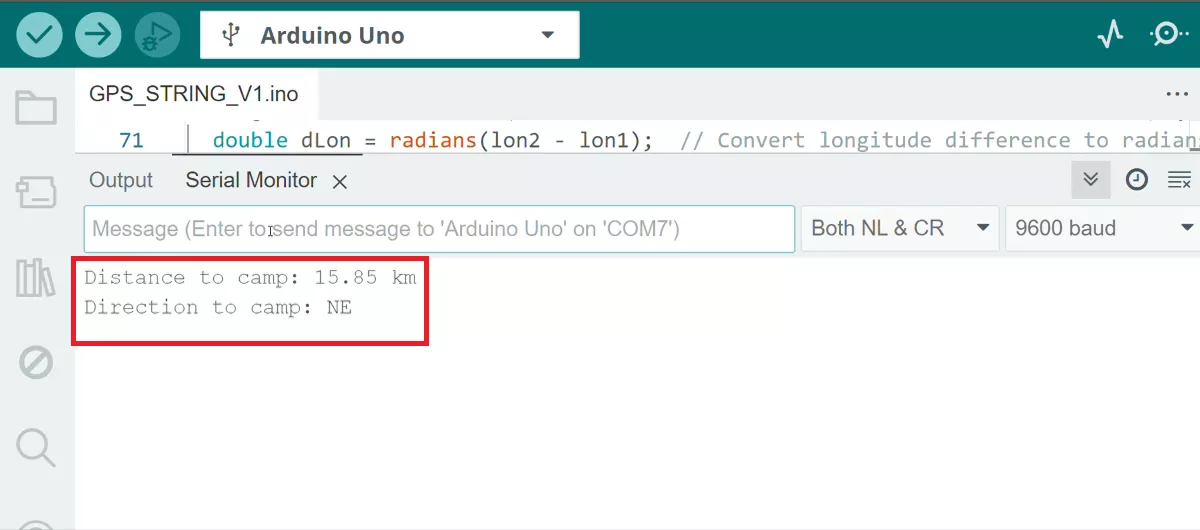
Screen-Shot of Output