
58. AC SSR Heater Control
1. Component Purpose
A heater in a temperature control system switches ON and OFF frequently — often hundreds of times per hour. Mechanical relay contacts would wear out quickly under this duty cycle.
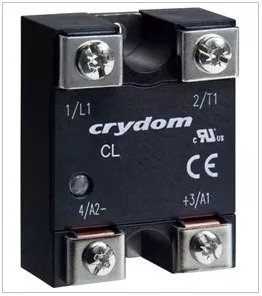
A Solid State Relay (SSR) uses semiconductor switching (typically a TRIAC for AC loads) instead of mechanical contacts. This gives silent operation, no contact bounce, no mechanical wear, and extremely long life even with frequent switching.
Most AC SSRs use zero-cross switching — they turn ON only when the AC waveform crosses zero. This reduces EMI and inrush current on resistive loads like heaters.
Required: SSR · SPST-NO · AC Output · 5VDC input · 230VAC load · ≥5A · Safety approved
2. How to Find It on DigiKey
Go to DigiKey.com → Relays → Solid State Relays
Apply these filters:
- Output Type → AC
- Voltage - Input → Range includes 5VDC (e.g., 3–32VDC)
- Voltage - Load → 240VAC or higher
- Load Current → 5A or higher
- Circuit → SPST-NO (1 Form A)
- Part Status → Active
Tip: SSR input voltage is usually a range (e.g., 3–32VDC), not a single value. Make sure 5V falls within the specified input range.
3. Key Specifications & What They Mean
| Specification | Required | Why |
|---|---|---|
| Relay Type | Solid State | No mechanical wear; long life. |
| Circuit | SPST-NO | Single normally-open output. |
| Output Type | AC | Switching 230VAC heater load. |
| Input Voltage | Includes 5VDC | Control signal from 5V logic. |
| Load Voltage | 230VAC rated | Must handle mains voltage. |
| Load Current | ≥5A | Heater draws 3A; margin for safety. |
| Temp Range | −40°C to +80°C | Panel-mount industrial conditions. |
| Safety Approval | UL/CSA/TUV | Required for mains switching. |
Important: SSRs generate heat when conducting. For loads above 2–3A, always mount the SSR on a heatsink. Without it, the SSR can overheat and fail.
4. Selecting a Safe, Production-Ready Part
The filtered list will show matching parts. Before you pick one, check: Is it Active? Is stock available? Is the manufacturer reputable? Is a datasheet available?
Full checklist: How to Select a Safe, Production-Ready Component — EWskills Guide
5. Filtered DigiKey Link
➡ View Matching Parts — AC SSR, 5V Input, 230VAC, ≥5A, SPST-NO