
Template (Generic Programming)
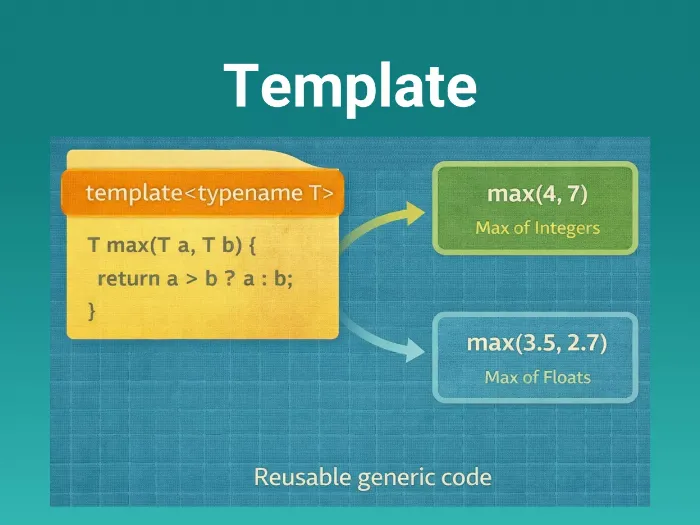
Templates allow you to write a single "blueprint" for a function or class that can work with any data type. Instead of writing swap_int, swap_float, and swap_double, you write one swap<T> function.
This is Compile-Time Polymorphism. The compiler sees how you use the template and generates (instantiates) the specific code for those types. It’s like a "Smart Macro" that respects type safety and scope.
Syntax & Usage
1. Function Templates
Write logic once, use it for different types.
// Template Declaration
// 'T' is a placeholder for a type (int, float, struct...)
template <typename T>
void swap_values(T& a, T& b) {
    T temp = a;
    a = b;
    b = temp;
}

int main() {
    int x = 10, y = 20;
    swap_values(x, y);     // Compiler generates: void swap_values(int&, int&)

    float f1 = 1.5, f2 = 4.5;
    swap_values(f1, f2);   // Compiler generates: void swap_values(float&, float&)
}
2. Class Templates
Crucial for creating generic data structures (Buffers, Queues, Linked Lists) where the logic is the same regardless of what data is stored inside.
// A Circular Buffer that can hold 'T' type objects
// 'Size' is a Non-Type Template Parameter (Constant Integer)
template <typename T, int Size>
class RingBuffer {
private:
    T buffer[Size]; // Array size fixed at compile time
    int head = 0;

public:
    void push(T val) {
        buffer[head] = val;
        head = (head + 1) % Size;
    }
};

// Usage
RingBuffer<int, 64> adc_buf;       // Buffer of 64 integers
RingBuffer<float, 10> sensor_avg;  // Buffer of 10 floats
RingBuffer<Packet, 128> uart_rx;   // Buffer of 128 custom Structs
How It Works (Template Instantiation)
Templates do not exist in the final binary until they are used.
When you write RingBuffer<int, 64>, the compiler acts like a code generator:
It takes the "Blueprint".
It replaces
TwithintandSizewith64.It compiles that new specific class.
Code | Compiler Action | Memory Usage |
|---|---|---|
| Generates sort_int(int* arr) | Code size increases by size of function. |
| Generates sort_float(float* arr) | Code size increases again. |
| Reuses existing sort_int | No new code generated. |
Specialized Templates (Template Specialization)
Sometimes generic code works for 99% of types, but fails for one specific type (like bool or char*). You can provide a special version for that type.
// Generic
template <typename T>
T add(T a, T b) { return a + b; }

// Specialization for 'char' (e.g., to prevent overflow or change logic)
template <>
char add<char>(char a, char b) {
    // Saturated addition logic for 8-bit audio
    int res = a + b;
    if (res > 127) return 127;
    return (char)res;
}
Relevance in Embedded/Firmware
Type-Safe Drivers (Zero Cost Abstraction)
In C, drivers often use
void*buffers and require casting (dangerous) or macros (hard to debug).Templates give you type safety with zero runtime overhead. The compiler resolves types during compilation, so the resulting assembly is as fast as hand-written C code.
Compile-Time Configuration
You can use "Non-Type Template Parameters" (integers, pointers) to configure hardware.
template <uint32_t BaseAddr>
class GPIO {
public:
    static void setHigh() {
        *(volatile uint32_t*)(BaseAddr) = 1;
    }
};

using LED_Port = GPIO<0x40021000>;
// LED_Port::setHigh() compiles to a direct memory write instruction!
Avoids
mallocStandard containers (
std::vector) use the Heap (malloc). In embedded, we hatemalloc.With templates, you can pass the size as a parameter (
RingBuffer<int, 64>), allowing the buffer to be allocated on the Stack or BSS (Static Memory).
The "Code Bloat" Myth vs Reality
The Fear: "Templates generate a copy of the code for every type, filling up my Flash memory."
The Reality: Yes,
vector<int>andvector<float>are two separate code blocks.However, if you manually wrote
IntVectorandFloatVectorstructs in C, you would have the exact same amount of code.Optimization: If different template instantiations result in identical assembly (e.g.,
MyClass<unsigned int>vsMyClass<int>on some architectures), the linker can sometimes merge them.
Common Pitfalls & Best Practices
Pitfall | Details |
|---|---|
❌ Header Definitions | Template code must be implemented in the Header File ( Why? The compiler needs to see the entire source code to generate the specific version when it compiles |
❌ Cryptic Error Messages | If you make a typo in a template, the compiler vomits 100 lines of error garbage. Tip: Always scroll to the very top error message; it usually points to the actual line. Ignore the "instantiated from here" chain below it. |
❌ Bloat via Permutation | Be careful with integer parameters.
|
✅ |
|
Concept understood? Let's apply and learn for real